Object
The Object sub-system, not to be confused with source objects, is the Continuum equivalent of Holders for Spectral Line. That is, it is a mechanism for holding intermediate results of data reduction.
You may save the results of continuum data reduction into an object element. Then change your search criteria to something different, say a different observing session, and then reduce that data and save it to the next object slot. Repeat this for each observing block until you have reduced all groups of continuum observations. Then you can plot the results to show trends in results like changes in intensity vs. elevation or time/date. Useful for monitoring changes in intensity vs. time for Quasars and variable sources.
Like your session global memory, the object memory is retained between invocations in Linuxpops.
Commands
    Object Handling Routine

    Mode: CONT

    Usage: object [options] [args]

    options are:

    /i  Initialize the entire object structure.

    /c  obj_name  Clear out all entries for the named object.
        Note: The planets and a few Quasars have predetermined indexes.
        See 'object /l' for a list of named objects.

    /d  [x y] [nolines]
        Display the results using x & y axis with error-bars
        Where x is:
          num  = observation number
          el   = elevation of each grouping.
          date = show date for x-axis. (not implemented)

        Where y is:
            Flux & janskys = Janskys
            tmb            = Main Beam Temperature
            app & eff      = Aperture/Beam Efficiency (See 'object save')

        [nolines] To suppress the plotting of connecting lines.

        NOTE: with no args just re-display based on last call

    /l  List the Currently Defined Objects.

    /m  Use Mouse to Place Fit Labels.

    /n  n Set the current working object index to n, [0 based][so, MAX = 31]

    /r  Record the current reduction set to the next available slot within the currently selected object.
        Note: If the freq, source and scans numbers are the same, the system will reuse the same slot.
        Note: You should set the expected flux and tmb before issuing this command.  Necessary for eff and app plots.

    /s  Print out a recap of all object slots for the currently selected object.
        /s  Sort the Array of Measurements by Increasing Elevation

    /h  help

    See Also: expected, gracefit,
    See Variables: nfit, expectedflux, expectedtmb

    NOTE: There are  32 Allowed Discrete Objects
          There are 128 Allowed sets of Measurements Per Object
Example
Here is an example script that demonstrates these features.
#
# Set the Environment
#
sw 0
#
# set the datafile
#
file /home/
data/con/sdd.con_001
#
# Set the mode to continuum
#
mode cont
#
# Set the calmode; In this case I want no calibration
#
calmode none
#
# Which IF to process; 0 means all
#
#
# Clear the date field; Let scan range pick the scans
#
date *
#
# set the Freq and delta
#
freq 88.63
delfreq 0.50
#
# Clear out the object array for this source;
#
object /c Jupiter
#
# Set the source to analyse
#
source Jupiter
#
# Sent the scan range to analyse
#
bscan 287
escan 308
#
# Tell linuxpops the expected Tmb and Janskys (flux);
# This is for efficiency measurement only.
#
expected 34.30 1058.0
#
# Analyze the data; 'cb' for Kitt Peak;
# 'c13' or 'c24' for Mount Graham
#
cb
#
# Record the results to the object array
#
object /r
#
# Repeat all the above for the remainder of the scan blocks.
# Only the scan range and expected tmb and flux need be changed.
# NOTE: If you change to another environment; then
# all the parameters need re-entry again; unless already set,
#
bscan 670
escan 679
cb
expected 34.34 1059.2
object /r
#
# Switch to the next file version containing more observations
#
fver 2
#
bscan 808
escan 812
expected 36.02 1111.0
cb
object /r
#
bscan 820
escan 824
expected 36.02 1111.0
cb
object /r
#
bscan 832
escan 836
expected 36.02 1111.0
cb
object /r
#
bscan 844
escan 848
expected 36.02 1111.0
cb
object /r
#
bscan 859
escan 863
expected 36.02 1111.0
cb
object /r
#
bscan 912
escan 916
expected 36.02 1110.9
cb
object /r
#
# Plot out the results
#
object /d num app lines
#
Results:
Linuxpops(C) >> object /s
Linuxpops(
C) >>
object /s
Linuxpops(
C) >> # Current Object Entry Set to: 3
Linuxpops(
C) >> # Current Observations Entry Set to: 7
Linuxpops(
C) >> # Object Jupiter
Linuxpops(
C) >> # Measurement[ 0]: (20) Scans: (287.02 - 308.02); Date: 2016.0128, 6.89 UT; El = 26.5
Linuxpops(
C) >> # Tmb: 34.79 32.51 0.00 0.00
Linuxpops(
C) >> # Expected Tmb: 34.30 34.30 34.30 34.30
Linuxpops(
C) >> # TmbSigma: 0.26 0.27 0.00 0.00
Linuxpops(
C) >> # Beam Eff: 101.44 94.78 0.00 0.00
Linuxpops(
C) >> # Flux: 849.51 793.73 0.00 0.00
Linuxpops(
C) >> # Expected Flux: 1058.00 1058.00 1058.00 1058.00
Linuxpops(
C) >> # FluxSigma: 6.37 6.53 0.00 0.00
Linuxpops(
C) >> # App Eff: 80.29 75.02 0.00 0.00
Linuxpops(
C) >> # Object Jupiter
Linuxpops(
C) >> # Measurement[ 1]: (10) Scans: (670.02 - 679.02); Date: 2016.0128, 13.47 UT; El = 42.5
Linuxpops(
C) >> # Tmb: 34.52 31.67 0.00 0.00
Linuxpops(
C) >> # Expected Tmb: 34.34 34.34 34.34 34.34
Linuxpops(
C) >> # TmbSigma: 0.08 0.07 0.00 0.00
Linuxpops(
C) >> # Beam Eff: 100.51 92.23 0.00 0.00
Linuxpops(
C) >> # Flux: 842.71 773.25 0.00 0.00
Linuxpops(
C) >> # Expected Flux: 1059.20 1059.20 1059.20 1059.20
Linuxpops(
C) >> # FluxSigma: 2.00 1.79 0.00 0.00
Linuxpops(
C) >> # App Eff: 79.56 73.00 0.00 0.00
Linuxpops(
C) >> # Object Jupiter
Linuxpops(
C) >> # Measurement[ 2]: ( 5) Scans: (808.02 - 812.02); Date: 2016.0210, 5.08 UT; El = 19.8
Linuxpops(
C) >> # Tmb: 37.61 35.66 0.00 0.00
Linuxpops(
C) >> # Expected Tmb: 36.02 36.02 36.02 36.02
Linuxpops(
C) >> # TmbSigma: 0.28 0.32 0.00 0.00
Linuxpops(
C) >> # Beam Eff: 104.43 99.01 0.00 0.00
Linuxpops(
C) >> # Flux: 918.37 870.76 0.00 0.00
Linuxpops(
C) >> # Expected Flux: 1111.00 1111.00 1111.00 1111.00
Linuxpops(
C) >> # FluxSigma: 6.72 7.84 0.00 0.00
Linuxpops(
C) >> # App Eff: 82.66 78.38 0.00 0.00
Linuxpops(
C) >> # Object Jupiter
Linuxpops(
C) >> # Measurement[ 3]: ( 5) Scans: (820.02 - 824.02); Date: 2016.0210, 5.79 UT; El = 28.6
Linuxpops(
C) >> # Tmb: 37.76 35.70 0.00 0.00
Linuxpops(
C) >> # Expected Tmb: 36.02 36.02 36.02 36.02
Linuxpops(
C) >> # TmbSigma: 0.13 0.18 0.00 0.00
Linuxpops(
C) >> # Beam Eff: 104.84 99.10 0.00 0.00
Linuxpops(
C) >> # Flux: 921.96 871.51 0.00 0.00
Linuxpops(
C) >> # Expected Flux: 1111.00 1111.00 1111.00 1111.00
Linuxpops(
C) >> # FluxSigma: 3.16 4.29 0.00 0.00
Linuxpops(
C) >> # App Eff: 82.99 78.44 0.00 0.00
Linuxpops(
C) >> # Object Jupiter
Linuxpops(
C) >> # Measurement[ 4]: ( 5) Scans: (832.02 - 836.02); Date: 2016.0210, 6.44 UT; El = 36.6
Linuxpops(
C) >> # Tmb: 37.88 35.85 0.00 0.00
Linuxpops(
C) >> # Expected Tmb: 36.02 36.02 36.02 36.02
Linuxpops(
C) >> # TmbSigma: 0.15 0.14 0.00 0.00
Linuxpops(
C) >> # Beam Eff: 105.15 99.54 0.00 0.00
Linuxpops(
C) >> # Flux: 924.76 875.37 0.00 0.00
Linuxpops(
C) >> # Expected Flux: 1111.00 1111.00 1111.00 1111.00
Linuxpops(
C) >> # FluxSigma: 3.58 3.39 0.00 0.00
Linuxpops(
C) >> # App Eff: 83.24 78.79 0.00 0.00
Linuxpops(
C) >> # Object Jupiter
Linuxpops(
C) >> # Measurement[ 5]: ( 5) Scans: (844.02 - 848.02); Date: 2016.0210, 7.06 UT; El = 43.9
Linuxpops(
C) >> # Tmb: 36.97 35.24 0.00 0.00
Linuxpops(
C) >> # Expected Tmb: 36.02 36.02 36.02 36.02
Linuxpops(
C) >> # TmbSigma: 0.11 0.09 0.00 0.00
Linuxpops(
C) >> # Beam Eff: 102.62 97.83 0.00 0.00
Linuxpops(
C) >> # Flux: 902.52 860.33 0.00 0.00
Linuxpops(
C) >> # Expected Flux: 1111.00 1111.00 1111.00 1111.00
Linuxpops(
C) >> # FluxSigma: 2.65 2.25 0.00 0.00
Linuxpops(
C) >> # App Eff: 81.23 77.44 0.00 0.00
Linuxpops(
C) >> # Object Jupiter
Linuxpops(
C) >> # Measurement[ 6]: ( 5) Scans: (859.02 - 863.02); Date: 2016.0210, 7.95 UT; El = 53.2
Linuxpops(
C) >> # Tmb: 38.49 35.52 0.00 0.00
Linuxpops(
C) >> # Expected Tmb: 36.02 36.02 36.02 36.02
Linuxpops(
C) >> # TmbSigma: 0.07 0.07 0.00 0.00
Linuxpops(
C) >> # Beam Eff: 106.86 98.62 0.00 0.00
Linuxpops(
C) >> # Flux: 939.77 867.33 0.00 0.00
Linuxpops(
C) >> # Expected Flux: 1111.00 1111.00 1111.00 1111.00
Linuxpops(
C) >> # FluxSigma: 1.59 1.77 0.00 0.00
Linuxpops(
C) >> # App Eff: 84.59 78.07 0.00 0.00
Linuxpops(
C) >> # Object Jupiter
Linuxpops(
C) >> # Measurement[ 7]: ( 5) Scans: (912.02 - 916.02); Date: 2016.0210, 12.87 UT; El = 38.1
Linuxpops(
C) >> # Tmb: 37.76 35.30 0.00 0.00
Linuxpops(
C) >> # Expected Tmb: 36.02 36.02 36.02 36.02
Linuxpops(
C) >> # TmbSigma: 0.07 0.08 0.00 0.00
Linuxpops(
C) >> # Beam Eff: 104.84 98.00 0.00 0.00
Linuxpops(
C) >> # Flux: 921.98 861.89 0.00 0.00
Linuxpops(
C) >> # Expected Flux: 1110.90 1110.90 1110.90 1110.90
Linuxpops(
C) >> # FluxSigma: 1.81 1.92 0.00 0.00
Linuxpops(
C) >> # App Eff: 82.99 77.58 0.00 0.00
Linuxpops(C) >> object /d num flux lines
Another Example
The following example shows how to derive the elevation gain curve of the telescope using a series of continuum sequence scans taken at various elevations..
#
# mars.prc
# Set the Environment
#
sw 15
#
saveenv
#
# set the datafile
#
file sdd.eht_001
#
# Set the mode to continuum
#
mode cont
#
# Set the Title
#
#
# Set the calmode; In this case I want no calibration
#
calmode none
#
# Apply no previously defined elevation gain
elgain = 0
#
# Which IF to process; 0 means all
#
#
# set the Freq and delta and clear date
#
freq 227.1
delfreq 0.50
date *
#
# Clear out the object array for this source;
#
object /c Mars
#
# Set the source to analyze
#
source Mars
#
# Sent the scan range to analyze
#
bscan 2057
escan 2067
#
# 'c13' for LSB or 'c24' for USB
#
c24
#
# You only need to call 'plan' when the date changes
# enough to effect the Tmb.
# 'plan' sets the expected Tmb and Flux if the selected
# source is a planet.
#
plan
#
# Record the results to the object array
#
object /r
#
# Repeat all the above for the remainder of the scan blocks.
# Saving each block as you go.
#
bscan 2069
escan 2079
c24
object /r
#
bscan 2081
escan 2091
c24
object /r
#
bscan 2093
escan 2103
c24
object /r
#
bscan 2105
escan 2115
c24
object /r
#
bscan 2117
escan 2133
c24
object /r
#
bscan 2135
escan 2145
c24
object /r
#
bscan 2147
escan 2157
c24
object /r
#
bscan 2159
escan 2169
c24
object /r
#
bscan 2171
escan 2181
c24
object /r
#
bscan 2183
escan 2193
c24
object /r
#
bscan 2197
escan 2207
c24
object /r
#
# Different day. April 25th
#
bscan 2229
escan 2256
c24
# You only need to call 'plan' when the date changes
# enough to effect the Tmb.
#
plan
object /r
#
# New Day April 26th
#
bscan 2264
escan 2271
c24
plan
object /r
#
bscan 2273
escan 2280
c24
object save
#
bscan 2282
escan 2289
c24
object /r
#
bscan 2291
escan 2304
c24
object /r
#
bscan 2306
escan 2313
c24
object /r
#
bscan 2315
escan 2322
c24
object /r
#
bscan 2324
escan 2337
c24
object /r
#
bscan 2339
escan 2346
c24
object /r
#
bscan 2348
escan 2355
c24
object /r
#
bscan 2357
escan 2364
c24
object /r
#
bscan 2372
escan 2379
c24
object /r
#
bscan 2381
escan 2388
c24
object /r
#
bscan 2390
escan 2403
c24
object /r
#
bscan 2405
escan 2412
c24
object /r
#
# Plot out the results
#
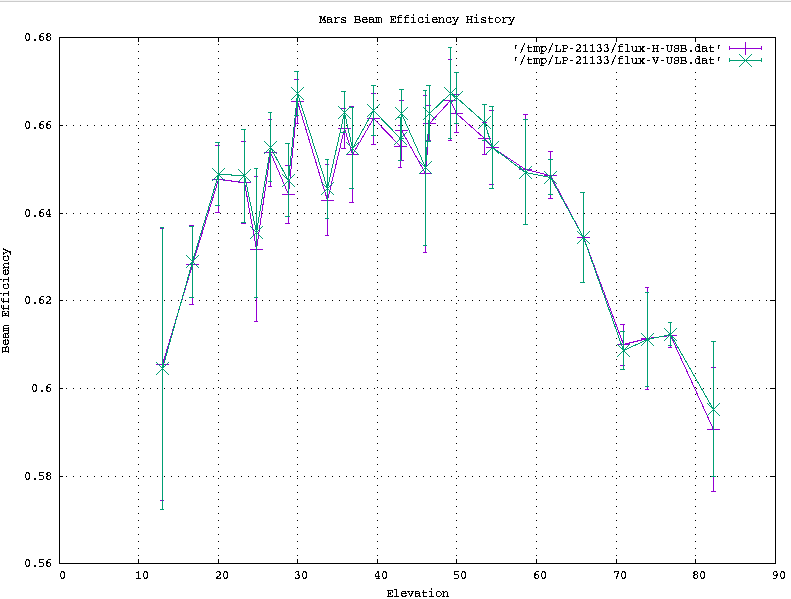
object /d el eff lines
#
# Sort by elevation
object /s /s
#
# re-display
object /d el eff lines
#
restoreenv
To execute this script:
    Linuxpops(C) >>  load mars.prc
    Linuxpops(C) >>
You notice all the commands involving object are in the script, so a nice plot should result:
Now, we need to fit a nfit LSQ curve to the data.
    LinuxPops(C) >> nfit = 2
    LinuxPops(C) >> gracefit /o    ( The /o tells gracefit to fit the curve to the OBJECT array data)
    Linuxpops(C) >>  # do_objectGraceFit(): Entered
    Linuxpops(C) >>  # do_objectGraceFit(): Using nfit = 2
    Linuxpops(C) >>  # H-USB: a0 = 5.7067e-01 a1 = 4.1261e-03 a2 = -4.7710e-05
    Linuxpops(C) >>  # V-USB: a0 = 5.7112e-01 a1 = 4.2001e-03 a2 = -4.8636e-05
    Linuxpops(C) >>
You should be presented with the following plot:
You will note that the resulting terms are still in %eff values as that was the data that was fitted. We need to normalize the data to 1.0.
    LinuxPops(C) >> normalize /o  ( Again, the /o tells the normalize function to work on the OBJECT data )
    Linuxpops(C) >>  # do_objectNormalize(): Max value for (H-USB): 0.659874
    Linuxpops(C) >>  # do_objectNormalize(): Max value for (V-USB): 0.661797
    Linuxpops(C) >>
Now, do another gracefit command to recompute the fitted values on the normalized data.
    Linuxpops(C) >> grace /o /s  ( The /s asked gracefit to save the results to the current env elgain_term_n variables; up to 5)
    Linuxpops(C) >>  # do_objectGraceFit(): Entered
    Linuxpops(C) >>  # do_objectGraceFit(): Using nfit = 2
    Linuxpops(C) >>  # H-USB: a0 = 8.6481e-01 a1 = 6.2528e-03 a2 = -7.2301e-05
    Linuxpops(C) >>  # V-USB: a0 = 8.6298e-01 a1 = 6.3465e-03 a2 = -7.3490e-05
    Linuxpops(C) >>  # Saving 3 Elevation Gain Terms
    Linuxpops(C) >>
You should see the following plot:
To see the elgain_terms type:
    Linuxpops(C) >>  dlist /k elgain
    Defined Dynamic Variables
    E:             elgain:      (int)                 0      If True, Use the defined Elevation Gain Terms
    E:       elgain_term1:      (double)         0.8639      User input elevation gain curve term 1
    E:       elgain_term2:      (double)         0.0063      User input elevation gain curve term 2
    E:       elgain_term3:      (double)    -7.2896e-05      User input elevation gain curve term 3
    E:       elgain_term4:      (double)     0.0000e+00      User input elevation gain curve term 4
    E:       elgain_term5:      (double)     0.0000e+00      User input elevation gain curve term 5
    Linuxpops(C) >>
You can see that the first 3 of 5 elgain terms are now populated with the previously computed terms.
Applying Elevation Gain Terms:
You can now apply there terms to future continuum analysis by setting the elgain flag to True.
    Linuxpops(C) >>  elgain = 1
    Linuxpops(C) >>  # Setting elgain to 1
    Linuxpops(C) >>
Now reload the original data and see the difference.
NOTE: be sure to comment out the 'elgain = 0' command in the mars.prc file before proceeding.
    Linuxpops(C) >>  load mars.prc
    Linuxpops(C) >>
You should be presented a much flatter set of data.



 1.8.5
1.8.5 
