Label
Description
The 'label' command allows you to place a label on the plot window. It can be used to label spectral features like lines.
Your are allowed 64 labels. Use 0 - 63 for 'n' in the create and delete command.
Synopsis
Linuxpops(
H0) >> label /h
Create or Delete a screen Label
Usage: label create n 'label text' [options]
Usage: label set n x.xx y.yy c d 'label text' [options]
Usage: label move n [options] (relocate a single label, n)
Usage: label delete n (deletes a single label, n)
Where: n = label number
x = xaxis placement
y = yaxis placement
c = color [0=blk,1=red,2=grn,3=yel,4=blu,5=mag,6=cyn,7=wht]
d = label direction [ 0=c,1=w,2=e,3=d]
'label text' is the label without quote marks
'filename' is the file to save/load label to/from
options are:
/c clear out all labels
/l List labels
/r filenmae, Load labels from 'filename'
/s filenmae, Save labels to 'filename'
/h help
/Cbl blue label
/Crd red label
/Cgr green label
/Ccy cyan label
/Cmg magenta label
/Cyl yellow label
/Cwt white label
default: Placement: (Label is Horizontal, Centered Above Mouse Click)
/e East Placement: (Label is Horizontal, to the Right of Mouse Click)
/w West Placement: (Label is Horizontal, to the Left of Mouse Click)
/d Down Placement: (Label is Vertical, Above Mouse Click)
/n No Arrow
/1 4 point Helvetica font
/2 6 point Helvetica font
/3 8 point Helvetica font
/4 10 point Helvetica font
/5 12 point Helvetica font (default)
/6 14 point Helvetica font
/7 16 point Helvetica font
/8 18 point Helvetica font
/9 20 point Helvetica font
See Also: hline, marker, forks
When creating a label you may be be asked to click on the plot to place it. The lower axis will then be used to set the actual x-placement of the label. If you change the axis using the 'fv' or 'cf' commands then these labels will no longer be placed correctly.
Labels are normally created horizontally, with a arrow pointing down at the point you placed it. If you select one of the four orientation options, the label will have a '<—' pre-pended or '—>' appended to the string. The '/d' flag will produce a vertical label with arrow just above where you clicked.
GNUPlot Enhanced Text Syntax
The actual label follows the gnuplot enhanced text syntax which allows for superscript and subscript text.
See the gnuplot manual for more info: http://gnuplot.sourceforge.net/docs_4.4/gnuplot.pdf page 22.
See also: http://materials.ucsd.edu/doc/ps_guide.pdf
Horizontal Lines
Description:
One can place up to 32 horizontal lines at some arbitrary value on the plot.
NOTE: At this time the plot auto-scale feature doesn't consider these h-line values in its calculation of Ymin to Ymax values.
Synopsis
Linuxpops(
H0) >> hline /h
Add a Horizontal Line to Plot
Usage: hline n val [options]
Usage: hline n [options]
Where: n = hline number
options are:
/c create nth hline
/d delete nth hline
/e erase all hlines
/l list hlines
/s save all hlines to filename
/r read all hlines from filename
/Cbl blue hline
/Ccy cyan hline
/Crd red hline
/Cgr green hline
/Cmg magenta hline
/Cyl yellow hline
/Cwt white hline
/h help
See Also: label, marker, fork, datestring
Marker Lines
Description:
User can place markers on the screen in spectral plots. User interaction with the mouse may be required.
Synopsis
Linuxpops(
H0) >> marker /h
Place Vertical Markers on Plot
Usage: marker /c n [options]
Usage: marker /p n x-axis-value [/a] [ /
m y1 y2]
Usage: marker /e n
Usage: marker /d
Usage: marker /l
Usage: marker /s filename
Usage: marker /r filename
Where: n = marker number [0 - 31]
options are:
/c create marker n
/p place marker n
/a Auto placement of y locations using plot scale
/l Auto placement of y locations using line intensities
/
m passed
args placement of y locations
/e erase marker n
/d delete all markers
/l list all markers
/s save all markers to filename
/r read & create markers from filename
/h help
/Cbl blue marker
/Crd red marker
/Cgr green marker
/Ccy cyan marker
/Cmg magenta marker
/Cyl yellow marker
/Cwt white marker
See Also: fork, label, hline, datestring
Forks
Description:
Forks allow the user to place a hyper-fine label on a spectral plot. User action with the mouse is required.
Synopsis
Create a Hyper-Fine Label Marker
Usage: fork /i n nt 'label text' [options] (initialize fork #n, of nt tines)
Usage: fork /a n
'label text' (create a fork based on
gaussian fits)
Usage: fork /d n (deletes fork #n)
Usage: fork /r
filename (read
'filename' containing predefined forks)
Usage: fork /s
filename (save the current fork list to
'filename')
Usage: fork /c (clears all forks)
Usage: fork /l (list currently defined forks)
Where: n = fork number; 0 - 31
Where: nt = number of tines; Max of 8 tines
'label text' is the label without quote marks
'filename' is the file to save/load fork to/from
options are:
/i initialize
/d delete
/s save
/r read
/l list
/c clear
/h help
/Cbl blue fork
/Crd red fork
/Cgr green fork
/Ccy cyan fork
/Cmg magenta fork
/Cyl yellow fork
/Cwt white fork
See Also: label, hline, marker
Date String
Description:
User may place a 'date' string on the spectral plot using the mouse. The 'date' can actually be any character string.
Synopsis
Linuxpops(
H0) >> datestring /h
Place a Date on Plot
Usage: datestring [date] [options]
where: 'date' is any user defined date string
options are:
/h help
/n use 'now' for time
/e erase the date
/Cbl blue date
/Crd red date
/Cgr green date
/Ccy cyan date
/Cmg magenta date
/Cyl yellow date
/Cwt white date
See Also: label, fork, hline, marker
Postage Stamp Plots
Description:
Users can super-impose a small postage stamp plot, of some region of the main plot, on top of the main plot. Good for when you want to zoom in to the baseline region, but still want to display the full profile of a stronger line.
Synopsis
Linuxpops(H2) >>
Linuxpops(H2) >> pstamp /h
Place a Postage Stamp Window on Spectral Plot
Usage: [n] [fname] [label] [options]
options are:
/e n, Erase Postage Stamp 'n'
/a Erase All Postage Stamps
/l List Postage Stamps
/c n 'label text', Create Postage Stamp 'n', with label 'label txt'
/r fname, Read in file of Postage Stamps
/w fname, Write out file of Postage Stamps
/Cbl blue pstamp
/Crd red pstamp
/Cgr green pstamp
/Ccy cyan pstamp
/Cmg magenta pstamp
/Cyl yellow pstamp
/Cwt white pstamp
/1 4 point Helvetica font
/2 6 point Helvetica font
/3 8 point Helvetica font
/4 10 point Helvetica font
/5 12 point Helvetica font (default)
/6 14 point Helvetica font
/7 16 point Helvetica font
/8 18 point Helvetica font
/9 20 point Helvetica font
/h help
See Also:
Linuxpops(H2) >>
This function requires 4 mouse clicks to place the box;
    1) The Left edge of the line of interest.
    2) The Right edge of the line of interest.
    3) The Upper Left Corner of where you would like to place the Box.
    4) The Lower Right corner of the box.
You may alternatively, have the function load a properly formatted file of boxes:
#
# Number Used Color X-min X-max boxUx BoxUy BoxLRx BoxLRy Size Label
#
0 1 0 -430.000 -490.000 -500.000 0.150 -1000.000 0.100 0 {/Helvetica=10 ^{12}CO }
2 1 0 1568.340 1500.280 1421.744 0.150 984.701 0.100 0 {/Helvetica=10 SiC_2 }
#
All X values must be in the bottom X-axis units; i.e. Freq Offset, Velocity Offset, Channel Number; Y units are in degrees Kelvin.
You may specify size of the text font either via the size field or in the label itself as shown above; if you choose the label method, then set the size to 0.
Example
Linuxpops(H2) >> acc
Linuxpops(H2) >> # Clearing out Title Block
Linuxpops(H2) >> # Sending SAT struct
Linuxpops(H2) >> # Spectral Line Accum
Source Freq UT-Date UTC Scan# NS Time Az El
Mode SB BKend Tsys Tcal Res Xoff Yoff
IRC+10216 231.000000 2019.1029 15.93 8334.02 12 30 224.5 65.2 LINEPS
H-
USB ARO-VL 129 299 0.62 0.0 0.0
IRC+10216 231.000000 2019.1029 16.06 8335.01 12 30 227.7 64.1 LINEPS
H-
USB ARO-HL 131 298 0.62 0.0 0.0
IRC+10216 231.000000 2019.1029 16.06 8335.02 12 30 227.7 64.1 LINEPS
H-
USB ARO-VL 132 298 0.62 0.0 0.0
IRC+10216 231.000000 2019.1029 16.17 8336.01 12 30 230.4 63.0 LINEPS
H-
USB ARO-HL 130 297 0.62 0.0 0.0
IRC+10216 231.000000 2019.1029 16.17 8336.02 12 30 230.4 63.0 LINEPS
H-
USB ARO-VL 132 297 0.62 0.0 0.0
IRC+10216 231.000000 2019.1029 16.28 8337.01 12 30 233.0 61.8 LINEPS
H-
USB ARO-HL 131 297 0.62 0.0 0.0
IRC+10216 231.000000 2019.1029 16.28 8337.02 12 30 233.0 61.8 LINEPS
H-
USB ARO-VL 133 297 0.62 0.0 0.0
IRC+10216 231.000000 2019.1029 16.40 8338.01 12 30 235.4 60.6 LINEPS
H-
USB ARO-HL 134 296 0.62 0.0 0.0
IRC+10216 231.000000 2019.1029 16.40 8338.02 12 30 235.4 60.6 LINEPS
H-
USB ARO-VL 135 296 0.62 0.0 0.0
IRC+10216 231.000000 2019.1029 16.53 8339.01 4 90 237.3 59.2 LINEBSP
H-
USB ARO-HL 136 296 0.62 0.0 0.0
IRC+10216 231.000000 2019.1029 16.53 8339.02 4 90 237.3 59.2 LINEBSP
H-
USB ARO-VL 135 296 0.62 0.0 0.0
IRC+10216 231.000000 2019.1029 16.65 8340.01 4 90 239.4 57.9 LINEBSP
H-
USB ARO-HL 136 297 0.62 0.0 0.0
IRC+10216 231.000000 2019.1029 16.65 8340.02 4 90 239.4 57.9 LINEBSP
H-
USB ARO-VL 135 297 0.62 0.0 0.0
IRC+10216 231.000000 2019.1029 16.76 8341.01 4 90 241.4 56.6 LINEBSP
H-
USB ARO-HL 136 296 0.62 0.0 0.0
IRC+10216 231.000000 2019.1029 16.76 8341.02 4 90 241.4 56.6 LINEBSP
H-
USB ARO-VL 135 296 0.62 0.0 0.0
IRC+10216 231.000000 2019.1029 16.88 8342.01 4 90 243.3 55.3 LINEBSP
H-
USB ARO-HL 137 296 0.62 0.0 0.0
IRC+10216 231.000000 2019.1029 16.88 8342.02 4 90 243.3 55.3 LINEBSP
H-
USB ARO-VL 136 296 0.62 0.0 0.0
IRC+10216 231.000000 2019.1029 16.99 8343.01 4 90 245.0 53.9 LINEBSP
H-
USB ARO-HL 137 297 0.62 0.0 0.0
IRC+10216 231.000000 2019.1029 16.99 8343.02 4 90 245.0 53.9 LINEBSP
H-
USB ARO-VL 136 297 0.62 0.0 0.0
IRC+10216 231.000000 2019.1029 17.11 8344.01 4 90 246.7 52.6 LINEBSP
H-
USB ARO-HL 140 297 0.62 0.0 0.0
IRC+10216 231.000000 2019.1029 17.11 8344.02 4 90 246.7 52.6 LINEBSP
H-
USB ARO-VL 139 297 0.62 0.0 0.0
IRC+10216 231.000000 2019.1029 17.22 8345.01 4 90 248.3 51.2 LINEBSP
H-
USB ARO-HL 142 297 0.62 0.0 0.0
IRC+10216 231.000000 2019.1029 17.22 8345.02 4 90 248.3 51.2 LINEBSP
H-
USB ARO-VL 142 297 0.62 0.0 0.0
IRC+10216 231.000000 2019.1029 17.34 8346.01 4 90 249.8 49.8 LINEBSP
H-
USB ARO-HL 143 297 0.62 0.0 0.0
IRC+10216 231.000000 2019.1029 17.34 8346.02 4 90 249.8 49.8 LINEBSP
H-
USB ARO-VL 142 297 0.62 0.0 0.0
IRC+10216 231.000000 2019.1029 17.45 8347.01 4 90 251.2 48.4 LINEBSP
H-
USB ARO-HL 145 297 0.62 0.0 0.0
IRC+10216 231.000000 2019.1029 17.45 8347.02 4 90 251.2 48.4 LINEBSP
H-
USB ARO-VL 145 297 0.62 0.0 0.0
IRC+10216 231.000000 2019.1029 17.57 8348.01 4 90 252.6 47.0 LINEBSP
H-
USB ARO-HL 149 296 0.62 0.0 0.0
IRC+10216 231.000000 2019.1029 17.57 8348.02 4 90 252.6 47.0 LINEBSP
H-
USB ARO-VL 149 296 0.62 0.0 0.0
IRC+10216 231.000000 2019.1029 17.72 8349.01 12 30 254.8 45.2 LINEPS
H-
USB ARO-HL 149 297 0.62 0.0 0.0
IRC+10216 231.000000 2019.1029 17.72 8349.02 12 30 254.8 45.2 LINEPS
H-
USB ARO-VL 152 297 0.62 0.0 0.0
IRC+10216 231.000000 2019.1029 17.83 8350.01 12 30 256.0 43.8 LINEPS
H-
USB ARO-HL 155 297 0.62 0.0 0.0
IRC+10216 231.000000 2019.1029 17.83 8350.02 12 30 256.0 43.8 LINEPS
H-
USB ARO-VL 158 297 0.62 0.0 0.0
IRC+10216 231.000000 2019.1029 17.94 8351.01 12 30 257.2 42.4 LINEPS
H-
USB ARO-HL 155 296 0.62 0.0 0.0
IRC+10216 231.000000 2019.1029 17.94 8351.02 12 30 257.2 42.4 LINEPS
H-
USB ARO-VL 159 296 0.62 0.0 0.0
IRC+10216 231.000000 2019.1029 18.06 8352.01 12 30 258.3 41.0 LINEPS
H-
USB ARO-HL 156 296 0.62 0.0 0.0
IRC+10216 231.000000 2019.1029 18.06 8352.02 12 30 258.3 41.0 LINEPS
H-
USB ARO-VL 160 297 0.62 0.0 0.0
IRC+10216 231.000000 2019.1029 18.17 8353.01 12 30 259.4 39.5 LINEPS
H-
USB ARO-HL 161 297 0.62 0.0 0.0
IRC+10216 231.000000 2019.1029 18.17 8353.02 12 30 259.4 39.5 LINEPS
H-
USB ARO-VL 165 297 0.62 0.0 0.0
IRC+10216 231.000000 2019.1029 18.28 8354.01 12 30 260.5 38.1 LINEPS
H-
USB ARO-HL 160 297 0.62 0.0 0.0
IRC+10216 231.000000 2019.1029 18.28 8354.02 12 30 260.5 38.1 LINEPS
H-
USB ARO-VL 164 297 0.62 0.0 0.0
Linuxpops(H2) >> #
Linuxpops(H2) >> Avg Tsys: 143.3 for 41 scans; 4.10 Hours Int Time
Linuxpops(H2) >> # Displaying Plot: H2
Linuxpops(H2) >>
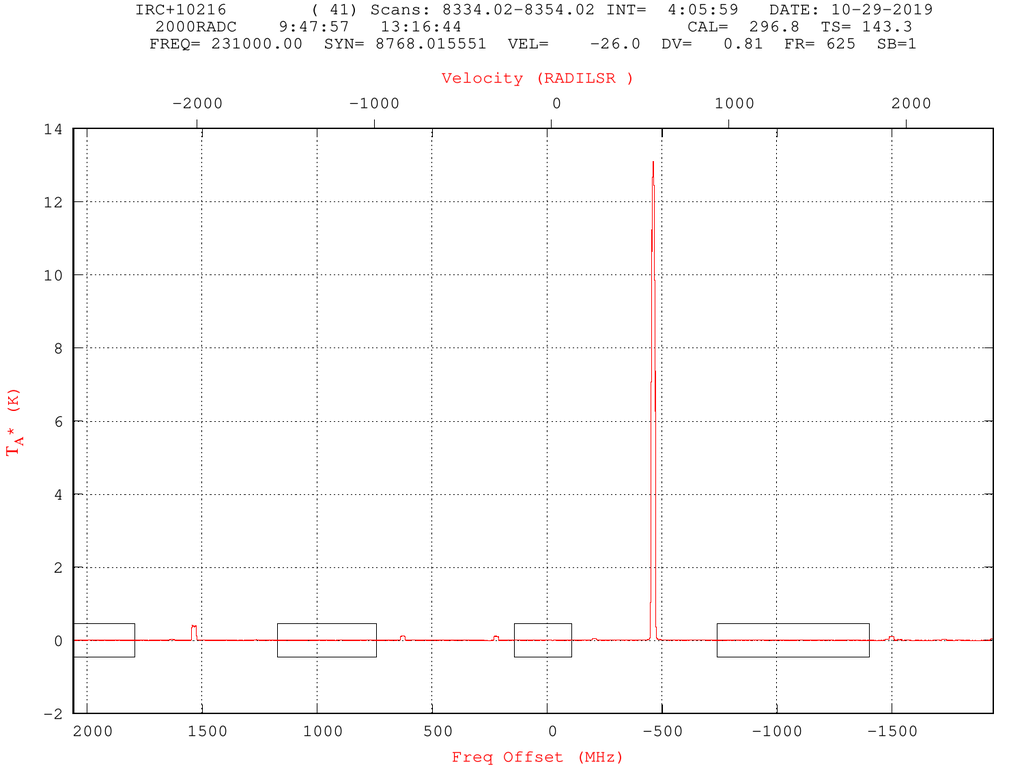
Figure #1: Results of Accum with a Strong Line Present
Now, lets zoom in to see the baselines:
Linuxpops(H2) >>
Linuxpops(H2) >> yrange -0.05 0.2
Linuxpops(H2) >> # Displaying Plot: H2
Linuxpops(H2) >>
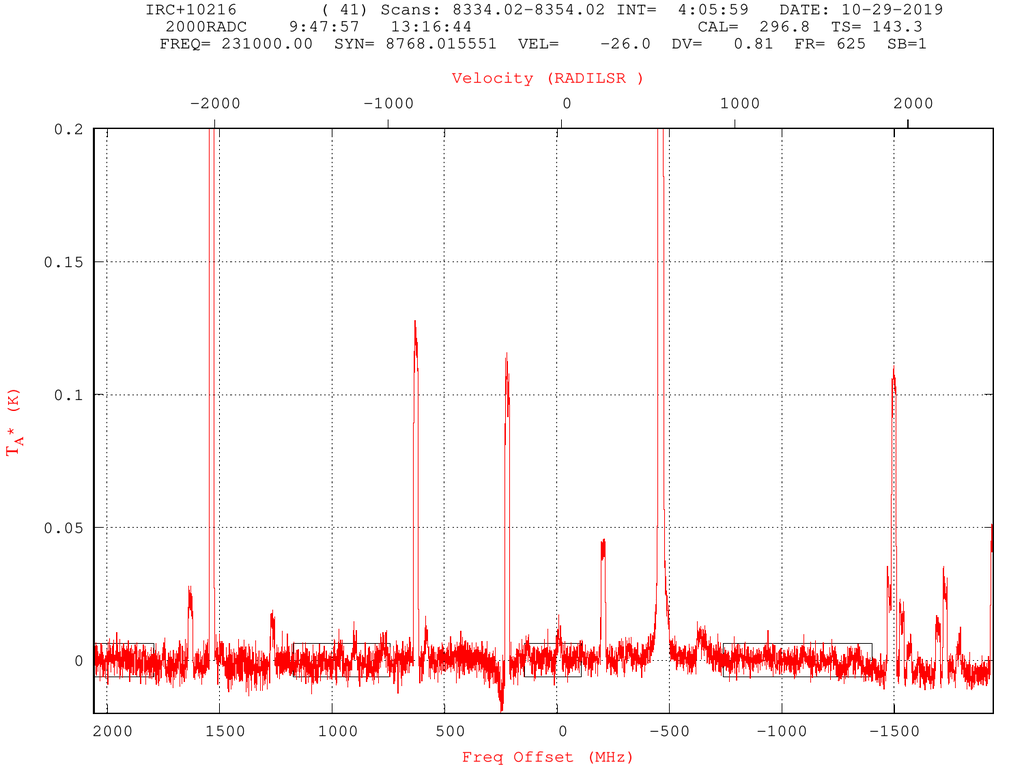
Figure #2: Plot Zoomed In
Now lets load in the postage stamp file shown above.
Linuxpops(H2) >>
Linuxpops(H2) >> pstamp /r 231.00.pst
Linuxpops(H2) >> # Clearing out all Postage Stamps
Linuxpops(H2) >> # Loading Postage Stamps from: 231.00.pst
#
# Number Used Color X-min X-max boxUx BoxUy BoxLRx BoxLRy Size Label
#
0 1 0 -430.000 -490.000 -500.000 0.150 -1000.000 0.100 4 {/Helvetica=10 12C16O }
2 1 0 1568.340 1500.280 1421.744 0.150 984.701 0.100 4 {/Helvetica=10 CH213CHCN }
#
Linuxpops(H2) >> # Sending PSTAMPS struct
Linuxpops(H2) >> # Displaying Plot: H2
Linuxpops(H2) >>
Here are the results:
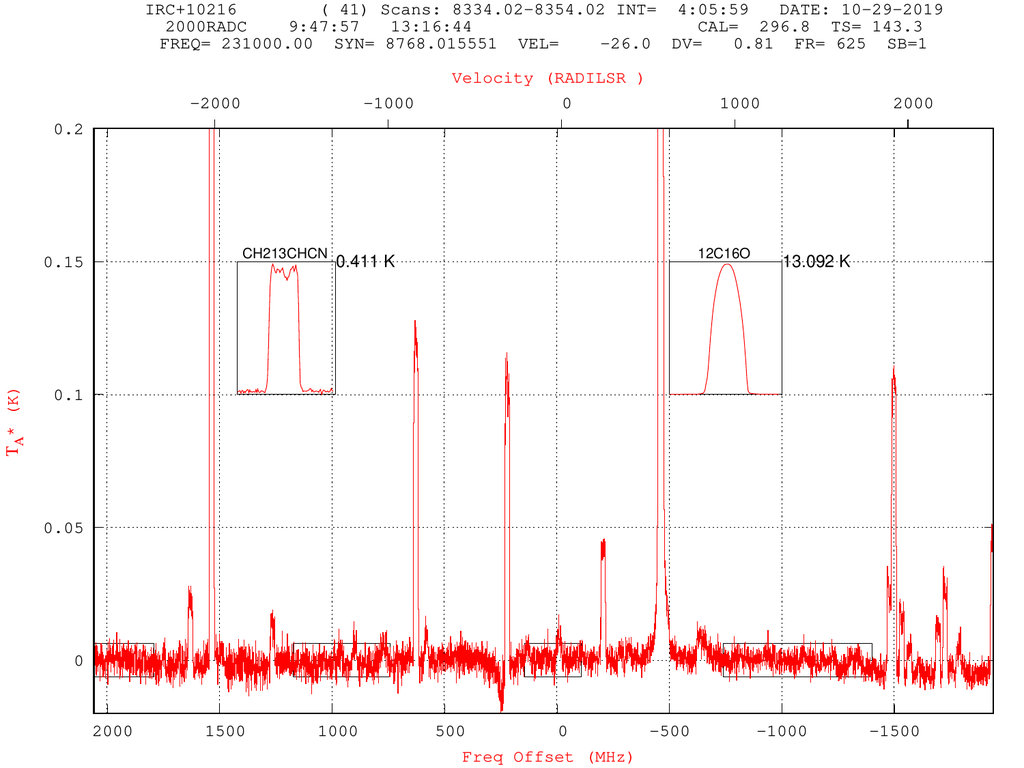
Figure #3: Resulting plot with Postage Stamp Plot Visible
Final Example
Here is an example using most of the features listed here:
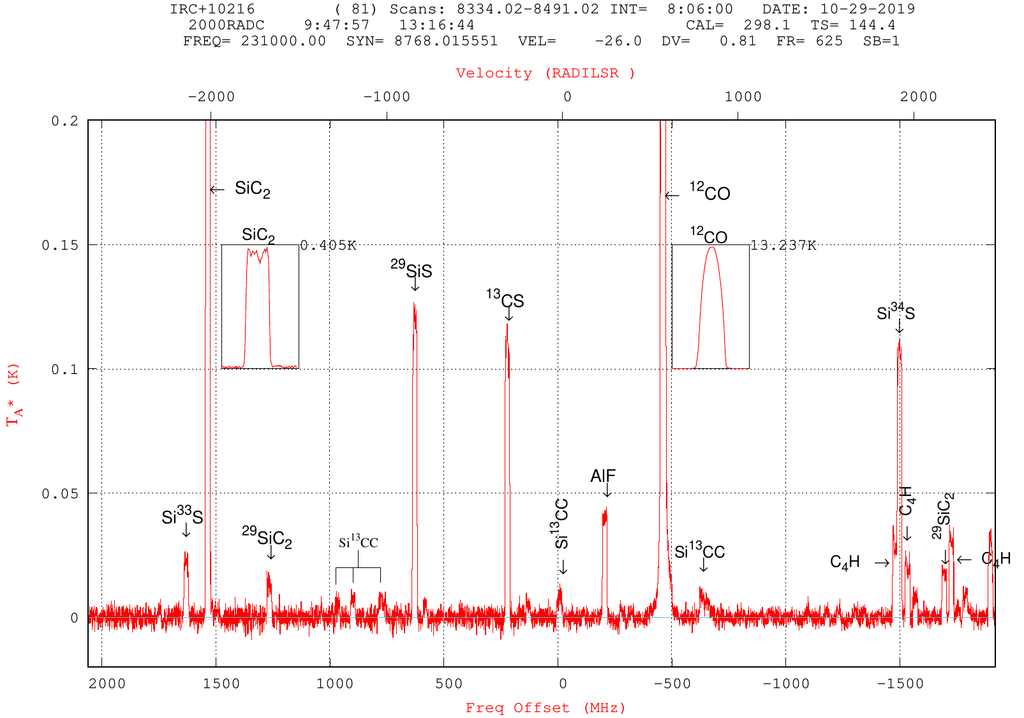
Figure #4: Plot showing Postage Stamps, Labels and Forks
 1.8.5
1.8.5 
