|
Linuxpops
3.01.04
Spectral Anaysis Package for Single Dish Data
|
|
Linuxpops
3.01.04
Spectral Anaysis Package for Single Dish Data
|
Spectral line focusing has been on our wish list of features for many years. Due to the lack of strong continuum sources at mm wavelengths, operators of forced to forgo any focus checks when the planets are not available. Add to the lack of sources, the rather large Sun avoidance zone, at the SMT, and there are times of the year where we are lucky to have more than 1 source to focus on. These leaves the operator no choice but to guess on the appropriate focus settings during various hourly changes.
For years, Spectral line pointing has been the main means of pointing for the SMT, again do to the utter lack of good continuum source at λ < 1 mm. The current procedure for Spec-5 pointing is to take a series of 5 scans, each at the various offset positions (North, South, Center, East & West) and have dataserv piece it all together to form a 5-point. I have never liked this method, and vowed not to repeat that mistake in implementing spec-focusing.
At present, the only way to analyze a spec focus is using Linuxpops. The internal procedure, sfocus accepts a scan number and fits Gaussian curve to the sums of each separate spectral feature.
There is now a new Rambo screen under the Spectra tab call Spectral Line BSP Focusing. It is shown with typical parameters already set.
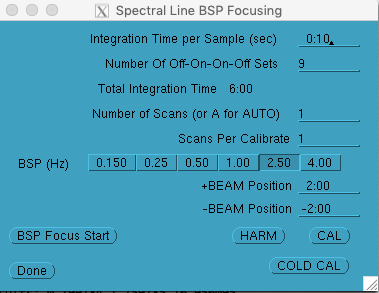
As can be seen in the configuration screen, we will be doing a single scan consisting of a 9 point focus each taking approximately 40 seconds for a total scan time of 6 minutes. Future updates will a have fields for F0 and F-Step values.
As far as the cactus control system is concerned, it's just another BSP scan. The only difference is that the exec task will flag the header variable openpar[5] with the value of 5555.5, before sending it off to the spectral-line system's comm task.
The spectral line task control, which sequences all observations, will notice that the openpar[5] header variable is set to the magic value, and move the focus between the various positions once every OFF-ON-ON-OFF BSP movements. The scan proceeds normally otherwise. Also, the bandpass-Q display will only update, during the scan, at the and of each OFF-ON-ON-OFF sets.
The spectral line process rtdata, which has the job of assembling finished scans into usable observations, also notices the magic value in openpar[5] and treats the data differently. Rather then adding up all the ON's and all the OFF's and doing the usual math to calibrate the data before writing to disk, rtdata separates each focus position's set of OFF-ON-ON-OFF, sums the two ON's, sums the two OFF's , calibrated the individual set and saves them into separate arrays called: sfoc_data[]. It does this for each enabled backend. See Figure 8, for a graphical representation of this.
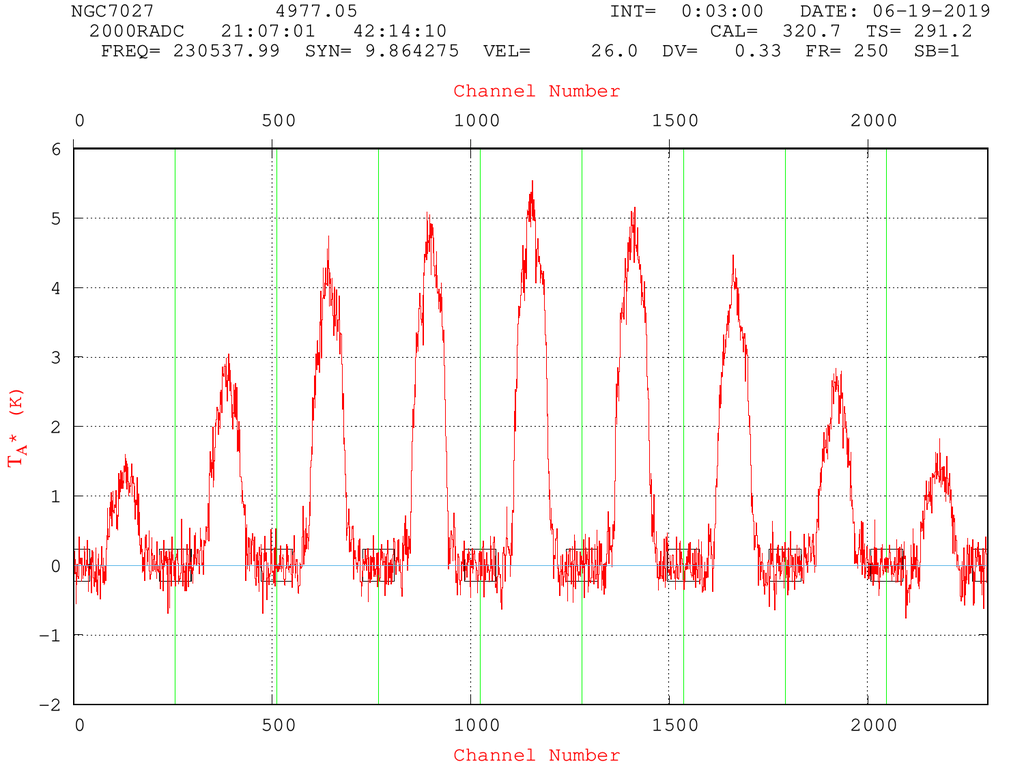
Much like an OTF scan which contains multiple spectral line TP bandpasses in each observation, a spec-focus contains, in this case, 9 individual fully calibrated spectra.
Figure 2 shows well behaved resulting data as it appears on disks.
To analyze Spectral Focus you simply type:
So, this procedure:
    Fetched the first scan
    Computed (9) proper baseline regions
    Displayed the scan
    Removed (9) separate linear baselines
    Re-plotted the scan
    Made a .png file of the raw data
    Summed up and averaged the total area under +/- 20 channels from center for each of (9) spectra
    Fit a Gaussian Curve to those (9) sums
    Plotted the Gaussian results
    Made a .png printout of the Gaussian plot
    Repeated the entire process for the second IF
    Printed out a recap. (Had the user passed the /t flag, the procedure would have sent the results to MONITOR)
Figure 3 shows the results of the first IF.

Behavior of Linuxpops execution of sfocus can be controlled using several variables.
Normally sfocus defaults to the center 40 channels for determining the 'sum under the curve' calculation, but the user can set sf_fitcenter to a different channel number if the emission line is off-center.
Set sf_fitmhz to the width of the expected emission otherwise +/- 20 channels is used.
Set sf_start or sf_end to the beginning or ending 'valid' spectra if there are problems with the ends of the data. (Note: the spectra are numbered 0 - 8 in the above examples)
Set sf_bchans to the number of beginning and ending channels to use for baseline removal; otherwise 40 is the default.
 1.8.5
1.8.5 
