Linuxpops  3.01.04
Spectral Anaysis Package for Single Dish Data
 All Classes Files Functions Variables Typedefs Enumerations Enumerator Macros Pages
LinuxPops Gridmap Commands

Introduction

Dual beam continuum Az-El mapping can be analyzed using the features of the Linuxpops gmap* functions.

Much of this introductory documentation was directly stolen from the paper:

CONTINUUM MAPPING WITH THE 12-M TELESCOPE; C. J. Salter (N.R.A.O., Tucson); July 1985

So, when we speak of the 12M, we are also refereeing to the SMT 10M.

Continuum Observing at Millimeter Wavelengths

At radio wavelengths, the single-dish observer grapples with the problem of detecting and mapping weak signals in the presence of both receiver noise and varying receiver drifts. For λ > 3 cm, the effects of the terrestrial atmosphere is usually only a minor irritation. However, at millimeter wavelengths the atmosphere can absorb one half, or more, of the power incident from a radio source, while radiating a large and variable quantity of power itself.

Even in the finest possible observing weather conditions, atmospheric emission makes it impossible to use the traditional radio techniques of total power, or load-switching, observations with the N.R.A.O. (now ARO) 12-m telescope. For some years, observers have used a technique of "beam-switching" at these high frequencies. The system takes the power difference between two feeds separated in the telescope focal plane. One feed can be positioned on the radio source of interest, while the other provides a reference signal from "blank sky". Apart from giving similar intensities for both signal and reference phases, the technique provides a high degree of rejection of the atmospheric emission, which is similar in the two angularly-nearby beams. Until the late 1970's beam-switching of this form was used exclusively to study sources whose sizes were less than the angular separation of the two beams. For larger sources, emission from different areas of the source contribute simultaneously to the power received in each beam. This results in a complicated image that cannot be interpreted directly.

However, Emerson, Klein and Haslam (Astron. Astrophys., 76, 92, 1979) demonstrated that a simple algorithm exists for reconstructing the brightness distribution of such sources, as if they had been observed with a single beam. It is this algorithm that is used by the present continuum mapping system in analyzing data from the 12-m telescope.

The Emerson, Klein and Haslam Algorithm

A detailed description of the algorithm can be found in both Emerson et al (see above) and Klein (Diplomarbeit, University of Bonn, 1978; in German). Only a brief outline will be included here, highlighting points of relevance to the 12-m system.

At wavelengths around λ 3cm, the effects of atmospheric emission overwhelm the importance of atmospheric absorption. At millimeter wavelengths, both must be taken into account if accurate intensity calibration is to be achieved. While the beams of a dual-beam observation diverge in the far-field of the antenna, there is a high degree of overlap in the near-field, and hence within the atmosphere. Taking the power difference between the two beams largely subtracts the atmospheric emission. Even then, it should be noted, only the best possible observing weather is suitable for making successful millimeter-wave continuum observations. This is especially true at either λ 1.3 or 0.8 mm.

The far-field limit of a telescope of diameter D is at D2/2λ. For the 12-m telescope this represents a distance of 24 km at λ 3mm wavelength, while most atmospheric emission originates below heights of 2-3 km. At the 12-m telescope the two beam directions are obtained by rocking the subreflector (often called "nutating") between two fixed positions. The separation of these positions can be varied from zero up to about 5 arcmin. Typically, recommended beam separations are 4 arcmin at λ 3mm and 2 arcmin at λ 1mm.

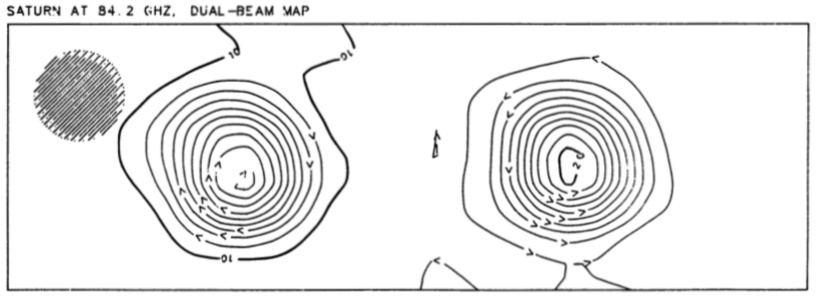
If the object is smaller than the beam separation, Fig. 1, the images from the two beams are distinct and the observer can either map just one image, using the other beam as a reference signal, or use a "shift and subtract" method to obtain his result.
Gridmap-Figure-1.jpg
Figure #1

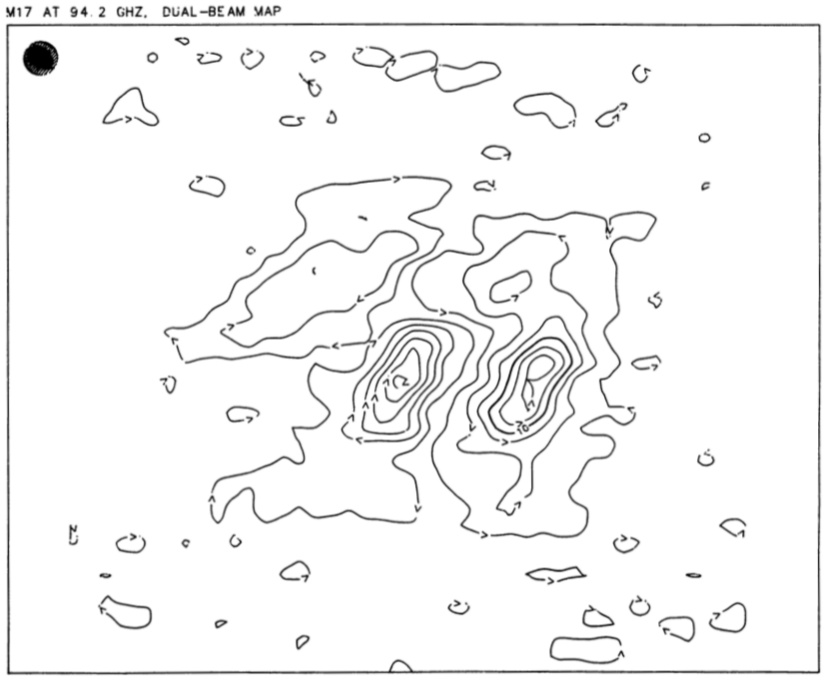
When the source is more extended that the beam separation, Fig. 2, a more sophisticated analysis technique is required. Let us suppose that our map has been made from a raster of scans, with the telescope scanning along the direction defined by the separation of the beams. At the 12-m telescope the beams are separated in azimuth to give the best possible "weather rejection". The transformation from an az-el frame to an R.A.-dec frame is made during the analysis.
Gridmap-Figure-2.jpg
Figure #2
Gridmap-Figure-3.png

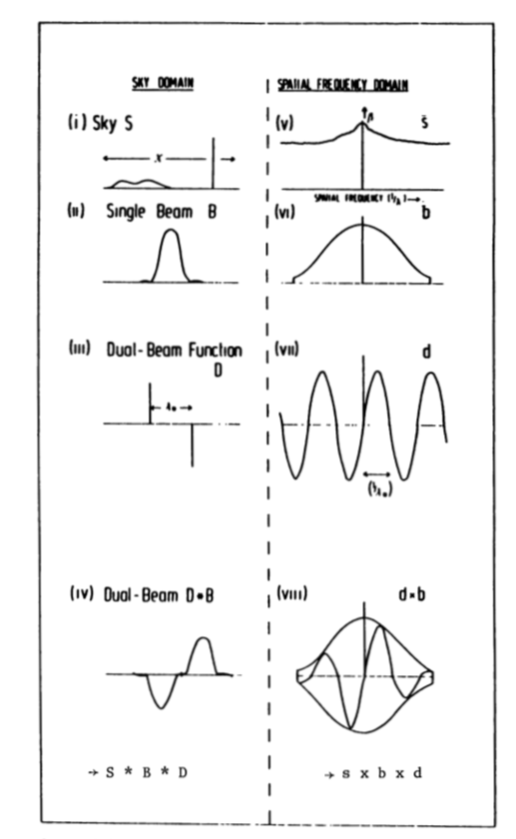
Figure #3: Schematic representation of a true source brightness distribution S(i), the single beam B(iv), the dual-beam functions D(iii) and the dual-beam D * B(iv) with the amplitudes β of the respective Fourier transform representations s, b, d, d X b shown in (v)-(viii). The scales are arbitrary.

Following Emerson et al, we consider what effect the dual-beam observing has had on our maps. Suppose that the two beams have identical polar diagrams. If, Figs. 3 i) - iii), S is the true source intensity distribution, B is the polar diagram of a single beam, and D is the "dual-beam function", (consisting of two δ-functions spaced by the beam separation), then I, the resulting dual-beam response, Fig. 3 iv), is

Gridmap-Formula-1.png

(Where * denotes convolution, and x denotes multiplication)

However, we wish to obtain the equivalent single-beam response, P, given by

Gridmap-Formula-2.png

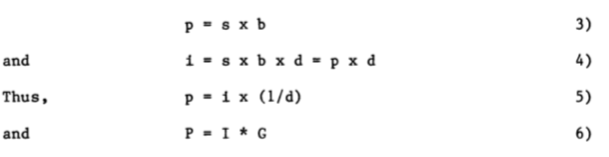
Denoting the Fourier transforms of these quantities by lower-case letters, Figs. 3 v) - viii), we have
Gridmap-Formula-3-4-5-6.png

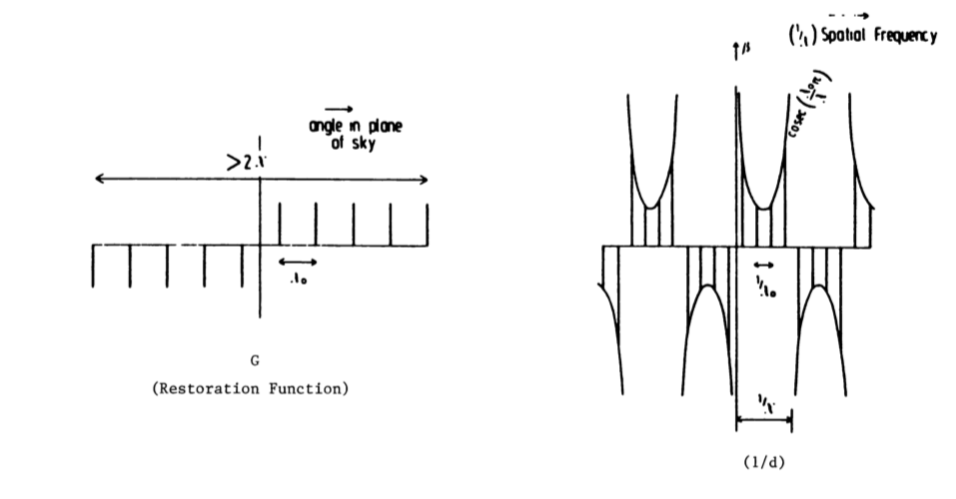
where G is the Fourier transform of (1/d), see Fig. 4.

We see that convolving the scans of our map with the function G of Fig. 4 will restore the equivalent single-beam observation. Note that G is made up of δ-functions spaced by the angular separation of the two beams. The effects of the convolution with G on the signal-to-noise ratio as a function of spatial frequency, and details of the handling of finite sampling, are to be found in Emerson et al (1979) and Klein (1978).

In practice, a number of factors affect the application of the method. Firstly, the cancellation of atmospheric emission is always less than 100%, both due to less-than-complete overlap of the two beams within the atmosphere and fluctuations in the emission more rapid than the frequency of switching between the beams. Smaller beam separations cancel the atmospheric emission more completely, although as wide a separation as possible is desired to maximize the signal-to-noise ratio when mapping a large field (see below). If the weather is too choppy, it is probably time to consider spectroscopy! Secondly, the polar diagrams of the two beams can differ at low levels due to coma lobes or the beams may have slightly different gains. These differences, along with uncertainties in the separation-geometry of the two beams, can be the limiting factors on the dynamic range obtained for strong sources. The present implementation of the method permits a correction for the effect on the astronomical results of differing beam gains. Thirdly, the noise level increases for fields whose dimensions are many times the beam separation (see below).
Gridmap-Figure-4.png
Figure #4

The dynamic range of the final map can be improved by making several coverages of the source at different sidereal intervals, (and hence parallactic angles), and then combining the restored images. This will also reduce the variations of signal-to-noise ratio as a function of spatial frequency.

The intrinsic noise ripple on a dual-beam map following restoration can be approximated (in the case of perfect cancellation of atmospheric emission) to

Gridmap-Formula-7.png

where, τ is the integration time per point in the final map. β is the bandwidth and n is the total scan length in units of the beam separation.

Observing

The first thing we must do is take an actual beam switched az-el grid map.

Preparing and Making Observations

In planning observations, a number of factors should be borne in mind when deciding how to program your observations. You will be making a raster in azimuth and elevation and must allow for the necessary extra scan length to accommodate the two beams, as well as the region of interest. A simple and safe way when choosing the size of region to map is to pick a square field size that would cover adequately the largest dimension of the source if observing with a single beam. Allow sufficient zerolevel at the edges of the field. Add the separation of the two beams to the azimuth scan length. Choose a sampling interval (grid size) that is no greater than about (H.P.B.W. / 2.5).

When deciding on the total integration time needed to achieve your mapping objective, bear equation (7) in mind. You will usually get better results if the integration time per point, τ, is obtained via several maps (Say N), giving an integration time per map per point of τ/N. Remember, however, that for technical reasons the 12-m telescope acquires data at present by stepping between adjacent sampling points, rather than by continuous scanning. Thus, there is 0.5 to 1.0 sec dead-time between each integration and it is impractical to shorten the individual integration time too much. A sensible compromise is probably 4 - 10 sec per map per point.

Detailed instructions for setting up the telescope to make an azimuth-elevation map are to be found in the continuum section of the 12M Observers Manual. Here we will just stress the importance of making sure that a suitable pointing correction has to be applied in azimuth to bring the nominal pointing zero to a point midway between the two beams. Be sure to make sufficient atmospheric tips (SPTIP) to allow for variations in atmospheric absorption with time. Frequent CALIBRATES should be performed.

At least one calibration source should be mapped per day. The most accurate flux density calibration is achieved if a similar sized area is covered to that chosen for program sources. The ideal calibration source should be strong, with angular diameter much less than the telescope H.P.B.W. and of known, or predictable, flux density. With the present receivers at λ 3mm, Saturn is close to this ideal, while Venus and Jupiter are worthy of consideration. The situation at λ 1mm is less satisfactory, but Saturn, or Mars (with subsidiary calibration to the brighter planets), could be reasonable choices. Again, despite larger angular diameters, Jupiter and Venus can be used. Sufficient "five-point" measurements of standard sources over a wide elevation range should be obtained. These are used both to determine the best telescope pointing for off-line analysis and to look for possible gain-elevation effects.

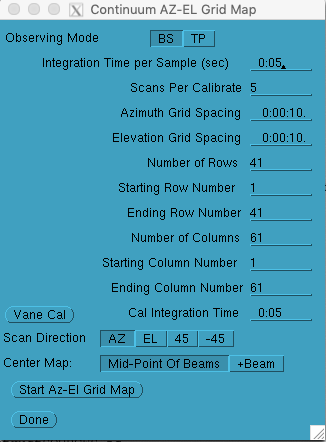
Below is the typical Rambo set up for performing a Az-El grid map.
Gridmap-Figure-5.png
Figure #5: Typical Az-El Gridmap Set up

Data Selection

Data Selection Criteria

First, it's important to set all the criteria necessary to process the map.

Linuxpops(C) >>
Linuxpops(C) >> switch 13
Linuxpops(C) >> Tittle Mars Grid Map
Linuxpops(C) >> mode cont
Linuxpops(C) >> filename /home/data/rpk/sdd.rpk_009
Linuxpops(C) >> source Mars
Linuxpops(C) >> freq 340.0
Linuxpops(C) >> delfreq 0.5
Linuxpops(C) >> bscan 2788
Linuxpops(C) >> escan * (unless you know the ending scan number)
Linuxpops(C) >> date * (or, yyyy.mmdd)
Linuxpops(C) >> feed 0 (will grid the 1st IF, xx.01, use 1, 2, 3, 4; 0 means grid all it can find)
Linuxpops(C) >> plotwin=2 (pick a number > 0; default window is 0, normally used for the scan plots)
Linuxpops(C) >> mbase 4 (sets the number of cells at each end of a row to use as baseline region)
Linuxpops(C) >> mapangle 60 30 (Pre-sets the plot window to 60 / 30 degrees)
Linuxpops(C) >>

NOTE: If there are strong features on the ends of your map, you can alternately set mbase -8, for instance, to tell Linuxpops to use the center 8 cells for baseline calculations. See variable mapbaselines.

Now check that all parameters are as you wish:

Linuxpops(C) >>
Linuxpops(C) >> params
Linuxpops(C) >> #
Linuxpops(C) >> # Environment Index: 13
Linuxpops(C) >> # Title: Mars Map
Linuxpops(C) >> # Mode: Cont
Linuxpops(C) >> # Data File: sdd.rpk_009
Linuxpops(C) >> # Datafile is type: SMT
Linuxpops(C) >> # Data File Contains Scans: 1066
Linuxpops(C) >> # Beginning Scan #: 2788.00
Linuxpops(C) >> # Ending Scan #: 50000.00
Linuxpops(C) >> # Frequency to Analyze: 340.000000
Linuxpops(C) >> # Delta Frequency Tol: 0.500000
Linuxpops(C) >> # Source to Analyze: Mars
Linuxpops(C) >> # Calibration Scale: 1.000
Linuxpops(C) >> # Calibration Mode: None
Linuxpops(C) >> # Show scans taken on: All
Linuxpops(C) >> # Show Scans /w Tsys < : 10000.0
Linuxpops(C) >> # Invert the Phases: Normal
Linuxpops(C) >> # Auto Application of SPTIPs: False
Linuxpops(C) >> # Display 'Ons': False
Linuxpops(C) >> # Split Phases: Normal
Linuxpops(C) >> # Planet Flux time: 0.00
Linuxpops(C) >> # Current Manual Tau0: 0.000
Linuxpops(C) >> # Last Fitted Tau0: 0.000
Linuxpops(C) >> # Map Baseline Samples: 4
Linuxpops(C) >> # Grid Map Angle: 60.0 30.0
Linuxpops(C) >> # Beam Effs: 0.88 0.88 0.88 0.88
Linuxpops(C) >> # Current Rej: 20.0 20.0 20.0 20.0
Linuxpops(C) >> # Ignored Scans:
Linuxpops(C) >> #
Linuxpops(C) >>

Now you can list the scans that meet the criteria:

Linuxpops(C) >>
Linuxpops(C) >> list
Mars 340.000000 2021.0223 1.90 2788.02 1 10 240.0 68.4 CONTCAL H-LSB D4G-HL 478 539
Mars 340.000000 2021.0223 1.90 2788.04 1 10 240.0 68.4 CONTCAL V-LSB D4G-VL 410 539
Mars 340.000000 2021.0223 1.91 2788.02 31 310 240.0 68.4 CONTMAP H-LSB D4G-HL 478 539 31 31 1 1 0 1.42
Mars 340.000000 2021.0223 1.91 2788.04 31 310 240.0 68.4 CONTMAP V-LSB D4G-VL 410 539 31 31 1 1 0 1.42
Mars 340.000000 2021.0223 1.97 2790.02 1 10 241.5 67.7 CONTCAL H-LSB D4G-HL 477 538
Mars 340.000000 2021.0223 1.97 2790.04 1 10 241.5 67.7 CONTCAL V-LSB D4G-VL 409 539
Mars 340.000000 2021.0223 1.97 2790.02 31 310 241.6 67.7 CONTMAP H-LSB D4G-HL 477 538 31 31 1 2 0 1.42
Mars 340.000000 2021.0223 1.97 2790.04 31 310 241.6 67.7 CONTMAP V-LSB D4G-VL 409 539 31 31 1 2 0 1.42
Mars 340.000000 2021.0223 2.03 2792.02 1 10 242.9 67.0 CONTCAL H-LSB D4G-HL 478 538
Mars 340.000000 2021.0223 2.03 2792.04 1 10 242.9 67.0 CONTCAL V-LSB D4G-VL 419 539
Mars 340.000000 2021.0223 2.04 2792.02 31 310 242.9 67.0 CONTMAP H-LSB D4G-HL 478 538 31 31 1 3 0 1.42
Mars 340.000000 2021.0223 2.04 2792.04 31 310 242.9 67.0 CONTMAP V-LSB D4G-VL 419 539 31 31 1 3 0 1.42
[...]
[snip snip]
[...]
Mars 340.000000 2021.0223 3.80 2844.02 1 10 266.5 45.5 CONTCAL H-LSB D4G-HL 544 543
Mars 340.000000 2021.0223 3.80 2844.04 1 10 266.5 45.5 CONTCAL V-LSB D4G-VL 437 543
Mars 340.000000 2021.0223 3.81 2844.02 31 310 266.5 45.5 CONTMAP H-LSB D4G-HL 544 543 31 31 1 29 0 1.42
Mars 340.000000 2021.0223 3.81 2844.04 31 310 266.5 45.5 CONTMAP V-LSB D4G-VL 437 543 31 31 1 29 0 1.42
Mars 340.000000 2021.0223 3.88 2846.02 1 10 267.1 44.6 CONTCAL H-LSB D4G-HL 547 543
Mars 340.000000 2021.0223 3.88 2846.04 1 10 267.1 44.6 CONTCAL V-LSB D4G-VL 438 543
Mars 340.000000 2021.0223 3.88 2846.02 31 310 267.2 44.5 CONTMAP H-LSB D4G-HL 547 543 31 31 1 30 0 1.42
Mars 340.000000 2021.0223 3.88 2846.04 31 310 267.2 44.5 CONTMAP V-LSB D4G-VL 438 543 31 31 1 30 0 1.42
Mars 340.000000 2021.0223 3.96 2848.02 1 10 267.8 43.6 CONTCAL H-LSB D4G-HL 551 543
Mars 340.000000 2021.0223 3.96 2848.04 1 10 267.8 43.6 CONTCAL V-LSB D4G-VL 443 543
Mars 340.000000 2021.0223 3.96 2848.02 31 310 267.8 43.5 CONTMAP H-LSB D4G-HL 551 543 31 31 1 31 0 1.42
Mars 340.000000 2021.0223 3.96 2848.04 31 310 267.8 43.5 CONTMAP V-LSB D4G-VL 443 543 31 31 1 31 0 1.42
Linuxpops(C) >>

Once you are satisfied, you are off to gridding the map.

Gridding.

It's simple to now grid the map using the gmapgrid command:

Linuxpops(C) >>
Linuxpops(C) >> gmapgrid ( gmap /g )
Linuxpops(C) >>

Assuming everything is set correctly, there will be a flurry of messages as it adds each scan row to the map. If not look for error messages, correct and try again.

Linuxpops(C) >>
Linuxpops(C) >> gmapgrid
Linuxpops(C) >> # Load Grid Map: 31 X 31
Linuxpops(C) >> # Processing Continuum Az-El Grid, Scan 2788.02
Linuxpops(C) >> # map_bin_and_cal_data(2): Using 2 Phase Switch Pattern
Linuxpops(C) >> # Plot Data: Peak = 0.022070, -Peak = -0.215965
Linuxpops(C) >> # map_bin_and_cal_data(2): Using 2 Phase Switch Pattern
Linuxpops(C) >> # Gridding 2788.02; Grid-Row 0
Linuxpops(C) >> # Processing Continuum Az-El Grid, Scan 2788.04
Linuxpops(C) >> # map_bin_and_cal_data(2): Using 2 Phase Switch Pattern
Linuxpops(C) >> # Plot Data: Peak = 0.302312, -Peak = -0.146596
Linuxpops(C) >> # map_bin_and_cal_data(2): Using 2 Phase Switch Pattern
Linuxpops(C) >> # Gridding 2788.04; Grid-Row 0
Linuxpops(C) >> # Processing Continuum Az-El Grid, Scan 2790.02
Linuxpops(C) >> # map_bin_and_cal_data(2): Using 2 Phase Switch Pattern
Linuxpops(C) >> # Plot Data: Peak = 0.052859, -Peak = -0.294969
Linuxpops(C) >> # map_bin_and_cal_data(2): Using 2 Phase Switch Pattern
Linuxpops(C) >> # Gridding 2790.02; Grid-Row 1
Linuxpops(C) >> # Processing Continuum Az-El Grid, Scan 2790.04
Linuxpops(C) >> # map_bin_and_cal_data(2): Using 2 Phase Switch Pattern
Linuxpops(C) >> # Plot Data: Peak = 0.427537, -Peak = -0.179069
Linuxpops(C) >> # map_bin_and_cal_data(2): Using 2 Phase Switch Pattern
Linuxpops(C) >> # Gridding 2790.04; Grid-Row 1
[...]
[snip snip]
[...]
Linuxpops(C) >> # Processing Continuum Az-El Grid, Scan 2846.02
Linuxpops(C) >> # map_bin_and_cal_data(2): Using 2 Phase Switch Pattern
Linuxpops(C) >> # Plot Data: Peak = 0.390475, -Peak = -0.000119
Linuxpops(C) >> # map_bin_and_cal_data(2): Using 2 Phase Switch Pattern
Linuxpops(C) >> # Gridding 2846.02; Grid-Row 29
Linuxpops(C) >> # Processing Continuum Az-El Grid, Scan 2846.04
Linuxpops(C) >> # map_bin_and_cal_data(2): Using 2 Phase Switch Pattern
Linuxpops(C) >> # Plot Data: Peak = 0.173551, -Peak = -0.475099
Linuxpops(C) >> # map_bin_and_cal_data(2): Using 2 Phase Switch Pattern
Linuxpops(C) >> # Gridding 2846.04; Grid-Row 29
Linuxpops(C) >> # Processing Continuum Az-El Grid, Scan 2848.02
Linuxpops(C) >> # map_bin_and_cal_data(2): Using 2 Phase Switch Pattern
Linuxpops(C) >> # Plot Data: Peak = 0.457952, -Peak = 0.039315
Linuxpops(C) >> # map_bin_and_cal_data(2): Using 2 Phase Switch Pattern
Linuxpops(C) >> # Gridding 2848.02; Grid-Row 30
Linuxpops(C) >> # Processing Continuum Az-El Grid, Scan 2848.04
Linuxpops(C) >> # map_bin_and_cal_data(2): Using 2 Phase Switch Pattern
Linuxpops(C) >> # Plot Data: Peak = 0.169612, -Peak = -0.530672
Linuxpops(C) >> # map_bin_and_cal_data(2): Using 2 Phase Switch Pattern
Linuxpops(C) >> # Gridding 2848.04; Grid-Row 30
Linuxpops(C) >> # Found 62 Scan(s) out of 1066 Matching Criteria
Linuxpops(C) >> # gridmap_removeBaselines(): Removing Linear Baseline Using 4 samples on both ends
Linuxpops(C) >>

NOTE: The gmapgrid command will automatically remove a baseline from the map unless you pass it the /n switch or alternatively, set mapbaselines to 0. Normally the baselines are computed using mapbaselines map cells from each end. If there is a strong feature at the ends of any rows, you can set mapbaselines to a negative number and that many cell in the middle of the map will be used. Not sure how this will work in an otherwise complex map. Really only works well for dual beam maps with a decent area of blank space in either the ends or middle. ( Will work on a more discriminating method))

Plotting.

Once the data has been ingested, you can plot a 3D image of the map:

Linuxpops(C) >>
Linuxpops(C) >> gmapplot ( gmap /p )
Linuxpops(C) >>

You should get a plot window that looks like this:
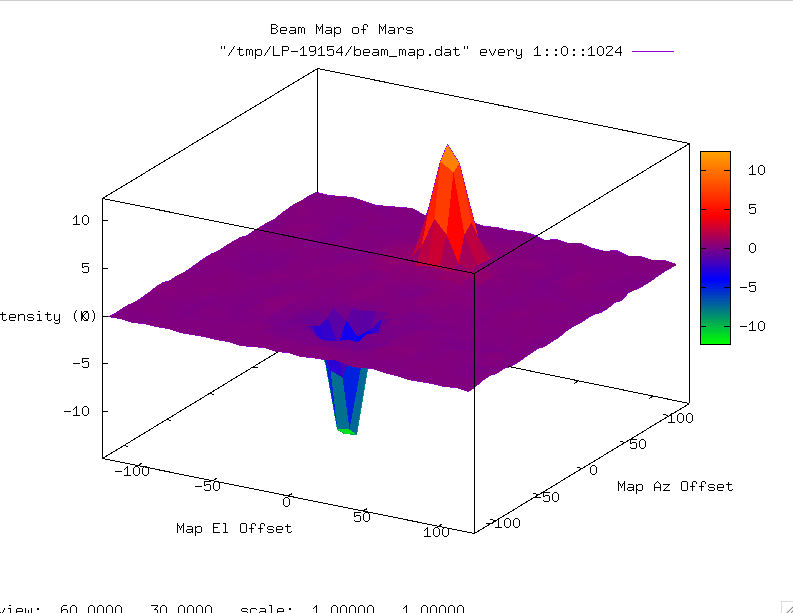
Gridmap-Figure-6.png
Figure #6 Default view of Gridded Map

Once this window is up, you can move it on all 3 axis by pressing and holding down the left-mouse button in the plot window and drag it about. If you are running this remotely from one of the telescopes, dragging motion can be very sluggish. Best if used locally. See the gnuplot manual for all the hot-key combos that effect the plot.

Modifying the plot:

There are many flags that can be passed to the gmapplot command:

Linuxpops(C) >>
Linuxpops(C) >> gmapplot /h ( gmap /p /h )
Plot 3D Gridded Map
Mode: CONT
Usage: gmapplot [options] [file_name]
Where: file_name is the name of the csv file create with the /c option
options are:
/0 Set Map angle to 60.0 & 30.0; Orthogonal
/1 Set Map angle to 180.0 & 90.0; Bottom View
/2 Set Map angle to 90.0 & 0.0; Side Neg Edge View
/3 Set Map angle to 0.0 & 0.0; Top View, vertical
/4 Set Map angle to 0.0 & 90.0; Top View
/5 Set Map angle to 90.0 & 270.0; Back Side Edge View
/6 Set Map angle to 90.0 & 180.0; Side Pos Edge View
/7 Set Map angle to 60.0 & 220.0; Orthognal Reversed
/8 Set Map angle to 90.0 & 90.0; Front Edge View
/9 Set Map angle to 270.0 & 270.0; Back Edge View (Upside Down)
/a Force a Square Aspect Ratio
/b include base plane; can not have /b & /w
/b Reverse surface plotting vs base plane
/c make a beam_map.csv file of map
/a Create an automatic file_name for map
/d Scale to dBs
/f Fixed Map Angle
/g Use Gray Scale Color Table
/i When drawing a surface, interpolate 2,2
/i multiple instances raises it ( up to 10,10)
/l include contours
/p make a PS file of plot
/p Twice: make a PNG file of plot
/s Place contours on Surface
/s Twice: Both Surface and Base Contours
/r Use RGB Color Table
/r Use Next Color Table
/v Verbose output
/w Wire-Frame View; Can not have /w & /b; negates /i
/h help
See Also: map_angle. gmapgrid
Linuxpops(C) >>

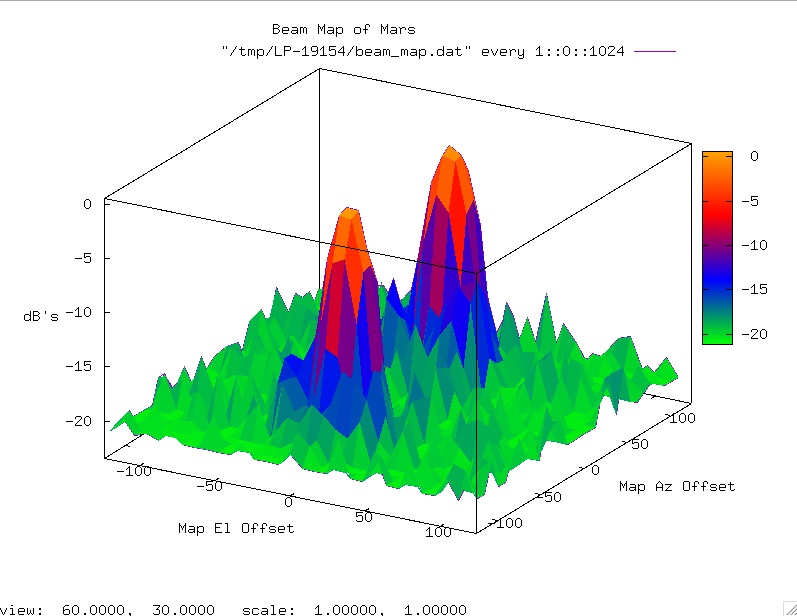
One of the more useful commands puts the plot into dB's to allow the engineers the ability to see side-lobes.

Linuxpops(C) >>
Linuxpops(C) >> gmapplot /d ( gmap /p /d )
Linuxpops(C) >>

Should produce to following:

Gridmap-Figure-7.png
Figure #7, Plot using data in log units.

Again, click and drag the mouse to rotate freely about all 3 axis.

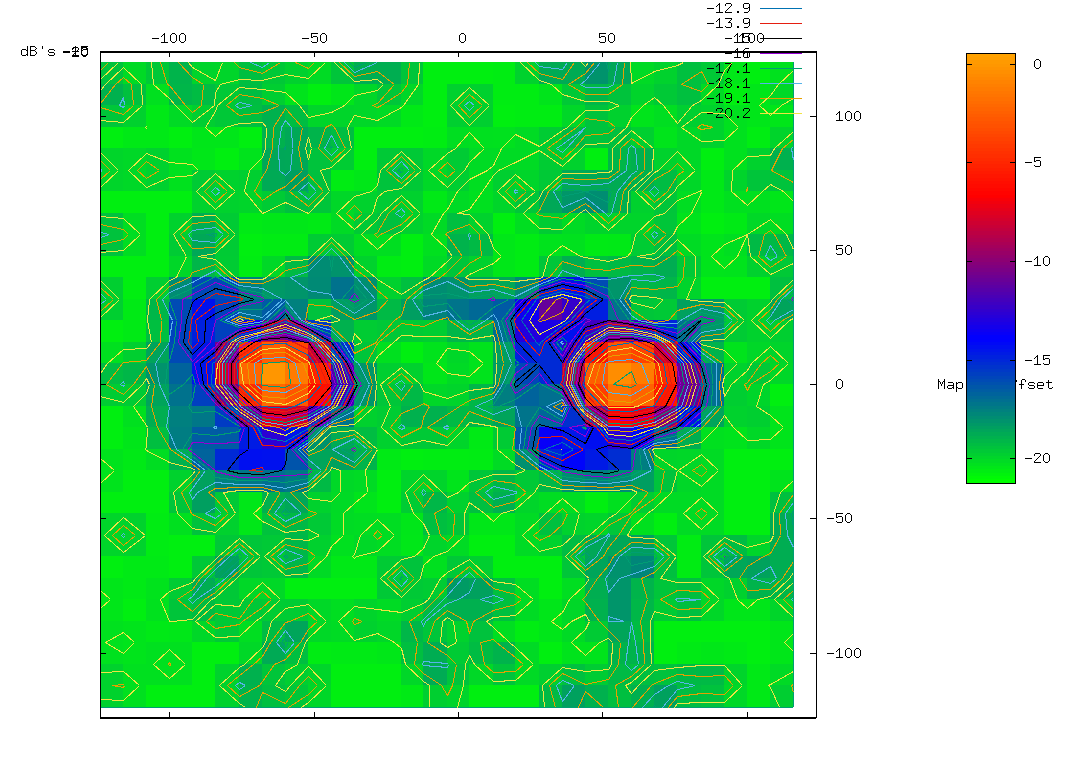
To produce an bottom up view, in log format with contours:

Linuxpops(C) >>
Linuxpops(C) >> gmapplot /d /l /1 ( gmap /p /d /l /1 )
Linuxpops(C) >>

Should produce the following:

Gridmap-Figure-8.png
Figure #8, Plot using data in log units.With Contours added

Other Useful Commands:

gmapgauss (Print out Gaussian statistics of map peaks))
gmapgrab (Force Gnuplot to make the az-el grid map window the default)
gmapslice xx (display a plot of a slice through row xx)
gmapstats (display info on loaded map)
gmaprotate (Rotate the map about the base axis)
gmapgauss:
Linuxpops(C) >>
Linuxpops(C) >> gmapgauss ( gmap /f )
Linuxpops(C) >>

will produce some text output about the middle slice of the map by performing a gauss fit on both the Negative and Positive peaks. It then calculates the distance, in arc-seconds, between the two peaks, the peak intensity and the half-power width. Good for verifying beam throw of the nutator.

See below section on Nutator

Linuxpops(C) >>
Linuxpops(C) >> gmapgauss
Linuxpops(C) >> # Fitting Gaussian Using Scan(s) 2818.02 2818.04 ; Offset 16; Arcsec = 8.0
Linuxpops(C) >> # Guess, Plus Peak: 11.83 @ Sample 23 or 184.00
Linuxpops(C) >> # Guess, Minus Peak: -11.90 @ Sample 8 or 64.00
Linuxpops(C) >> # Guess, Beam Sep: 120.00
Linuxpops(C) >> # Fitting a 5 Point Gauss to Plus Peak
Linuxpops(C) >> # Found Plus Beam @ 181.72, Peak = 12.11, Beam Width = 24.84
Linuxpops(C) >> # Fitting a 5 Point Gauss to Minus Peak
Linuxpops(C) >> # Found Minus Beam @ 61.10, Peak = -12.37, Beam Width = 24.61
Linuxpops(C) >> # Plus Beam + 58.90 arc-seconds From Center
Linuxpops(C) >> # Minus Beam - 61.72 arc-seconds From Center
Linuxpops(C) >> # Beam Sep: 120.63 arc-seconds
Linuxpops(C) >> # Beam Ratio: 0.98 Pos Beam Stronger ->
Linuxpops(C) >>

As can be seen, the distance between the peaks is very close to the programmed nutator spacing of +/- 1:00'. Also, it's good to note that the peak intensity is listed at +/- 12.2 K which is the expected Tmb for Mars on this date; 12.07K. This particular receiver is DBS, so the values measured are approximately twice the expected value considering the ~55-60% Beam efficiency of the SMT @ 340 GHz.

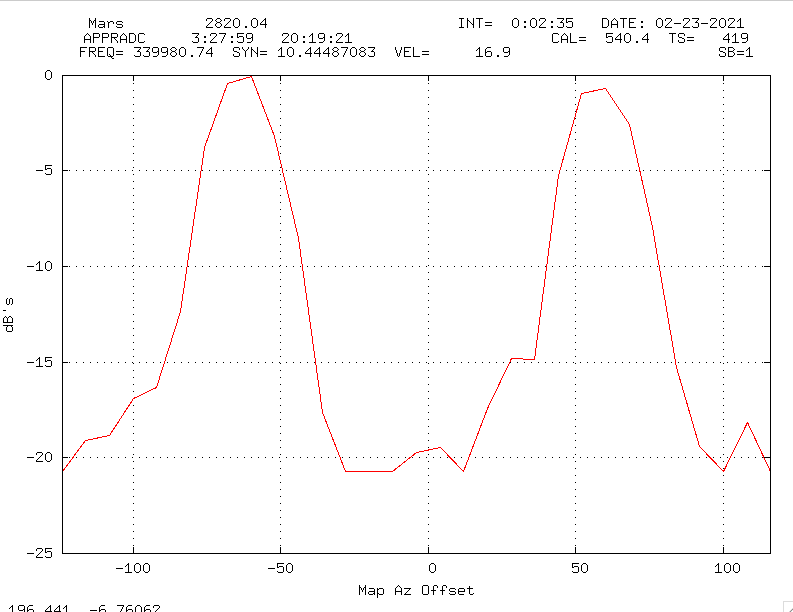
gmapslice:
Linuxpops(C) >>
Linuxpops(C) >> gmapslice 16 [/y] ( gmap /c [/y] 16 )
Linuxpops(C) >>

Use the '/y' flag to cut the slice vertically.

Should produce a plot like this: (assuming the map was last plotted in LOG format via the '/d' switch)
Gridmap-Figure-9.png
Figure #9, Plot os a slice through Grid Map row 16
gmapstats:
Linuxpops(C) >>
Linuxpops(C) >> gmapstats ( gmap /s )
# MAP Source (Name): Mars
# MAP X-Axis (Cols): 31
# MAP Y-Axis (Rows): 31
# MAP Delta-X (Secs): 8
# MAP Delta-Y (Secs): 8
# MAP Size-X (Secs): 248
# MAP Size-Y (Secs): 248
# MAP Start-X: 0
# MAP End-X: 31
# MAP Start-Y: 0
# MAP End-Y: 31
# MAP Freq (GHz ): 340.000
# MAP Num of Scans: 62
# MAP Blines Samples: 4
# MAP Blines Removed: 1
# MAP First Scan: 2788.02
# MAP Last Scan: 2848.04
# MAP Y-Label: dB's
Linuxpops(C) >> gmapstats
Linuxpops(C) >>
Linuxpops(C) >> gmapstats /h ( gmap /s /h )
Display statistics of a Grid Map
Mode: CONT
Usage: gmapslice [filename] [options]
options are:
/i Display Integrated Time for each Cell
/p Display Processed Values for each Cell
/r Display Raw Values for each Cell
/s Display Scan Counts for each Cell
/t Display Average Tsys for each Cell
/w filename, write stats to 'filename'
/h help
See Also:
Linuxpops(C) >>

The '/w' switch will produce a csv format file, of your naming, containing the map statistics; most useful if you pass the '/r' (raw) or '/p' (processed) switch.

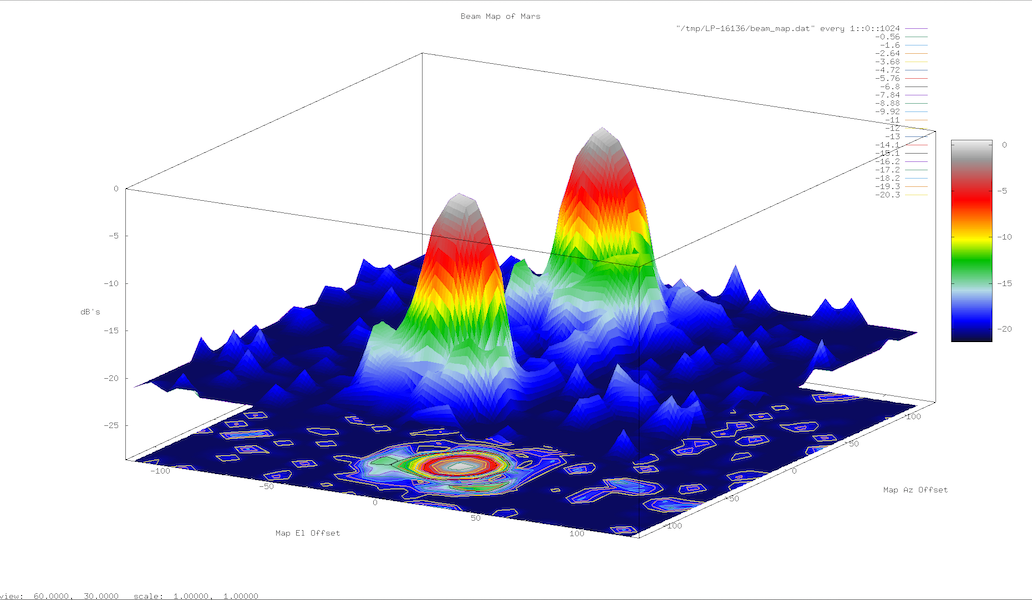
Finally:

Linuxpops(C) >>
Linuxpops(C) >> gmapplot /d /l /b /b /r /i /i /i /i /i ( gmap /p /d /l /b /b /r /i /i /i /i /i )
Linuxpops(C) >>

Should produce to following cool plot:
Gridmap-Figure-10.png
Figure #10, Plot using data in log units, alternate colors and interpolation
Rotating the Map:
Linuxpops(C) >>
Linuxpops(C) >> gmaprotate /h ( gmap /r /h )
Rotate Grid Map Display 360 degrees
Mode: CONT
Usage: gmaprotate [options]
options are:
/r Record and composite into movie
/k Keep Intermediate Frames in /tmp
/v Verbose output
/h help
See Also:
Linuxpops(C) >>

This command will rotate the map about the base plane 360 degrees using your last gmapplot command args. If you pass the /r flag a movie will be produced in the local directory. You may also pass the /k flag to keep the individual frames that made up the movie. ( they will be in the /tmp directory) You can give the /v flag to have the command produce more verbose output.

gmap Command:

There is a shortcut function that combines all these commands into one frontend. It's call 'gmap' and allows a single command to do all of the above actions.

Linuxpops(C) >>
Linuxpops(C) >> gmap /h
Grid Map Frontend
Mode: CONT
Usage: gmap* [options]
options are:
/b Call: gmapmapbase, Remove Baseline from Gridded Map
/c Call: gmapslice, Cut a slice of map and display
/d Call: gmapdive, Plot Grid Map with varing dBs
/e Call: gmapclear, Clear out internal Gridmap data
/f Call: gmapgauss, Fit Gaussian to a Gridded Map Cente
/g Call: gmapgrid, Accumulate Selected CONTMAP Scans
/l Call: gmaplimits, Set / Reset Plotting Limits
/p Call: gmapplot, Plot 3D Gaussian Gridded Map
/r Call: gmaprotate, Rotate Gridmap and Snap images
/s Call: gmapstats, Display Stats of Grid Map
/x Call: gmapgrab, Force Gridmap Window to be Active
/h help
gmap is a frontend to multiple grid mapping functions:
See individual command help for their use.
CAUTION: This commad uses over-loaded flags; The above flags must be first
See Also: gmapclear, gmapdive, gmapgauss, gmapgrab, gmapgrid,
gmaplimits, gmapmapbase, gmaprotate, gmappgauss, gmapplot,
gmapslice, gmapstats
Linuxpops(C) >>

As can be seen, by giving the various modifier flags, all the other gridmap functions can be called from this single function. Just remember that the first flag determines the ensuing action.

All other flags that follow will be passed to the called function.

Nutator Command:

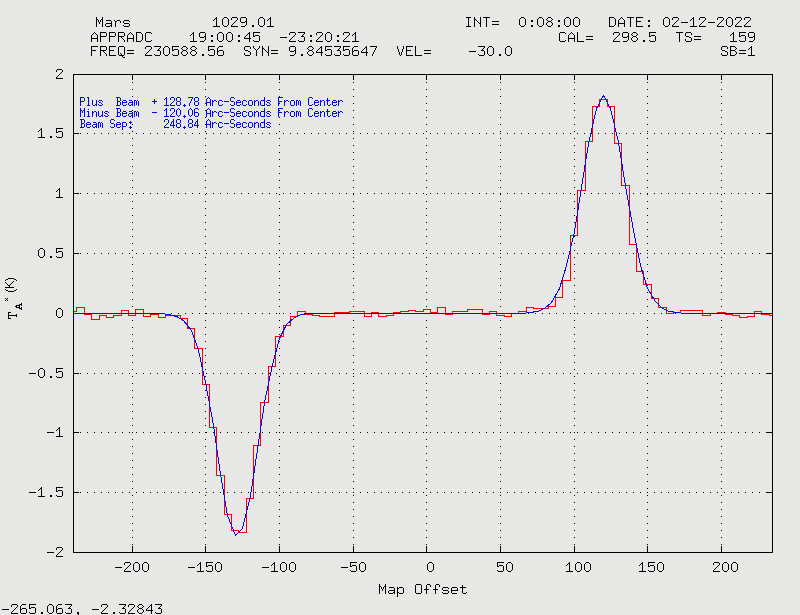
It is possible to determine the Nutator beam separation by analysing just the center row of a gridmap, or a single slice taken through a strong source using Az/El gridmap in Rambo.

If you know the scan number of the center row, then type:

Linuxpops(C) >>
Linuxpops(C) >> mapbaselines = 12 ( or less if there is very little 'baseline' region on the ends )
Linuxpops(C) >>
Linuxpops(C) >> nutator 1029.01 /b /b /g
Linuxpops(C) >> # Fetching Scan 1029.01 into H0
Linuxpops(C) >> # read_scan(): Returned: 1029.00
Linuxpops(C) >> # Processing Continuum Az-El Grid, Scan 1029.01
Linuxpops(C) >> # map_bin_and_cal_data(2): Using 2 Phase Switch Pattern
Linuxpops(C) >> # Plot Data: Peak = 2.445717, -Peak = -1.197450
Linuxpops(C) >> # removeContMapBaselines(): Removing Linear Baseline Using 12 samples on both ends + middle
Linuxpops(C) >> # Fitting Gaussian Using Scan(s) 1029.01; Arcsec = 5.0
Linuxpops(C) >> # Guess, Plus Peak: 1.79 @ Sample 72 or +120.00
Linuxpops(C) >> # Guess, Minus Peak: -1.84 @ Sample 23 or -125.00
Linuxpops(C) >> # Guess, Beam Sep: 245.00
Linuxpops(C) >> # Fitting a 9 Point Gauss to Plus Peak
Linuxpops(C) >> # Found Plus Beam @ 120.06, Peak = 1.82, Beam Width = 33.83
Linuxpops(C) >> # Fitting a 9 Point Gauss to Minus Peak
Linuxpops(C) >> # Found Minus Beam @ -128.78, Peak = -1.87, Beam Width = 32.58
Linuxpops(C) >> # Plus Beam + 128.78 arc-seconds From Center
Linuxpops(C) >> # Minus Beam - 120.06 arc-seconds From Center
Linuxpops(C) >> # Beam Sep: 248.84 arc-seconds
Linuxpops(C) >>
The /b means to remove a baseline using 'mapbaselines' number of samples in either side of the row.
The second /b means to also include the center 'mapbaselines' number of samples.
The /g tells the command to fit a Gaussian curve to both peaks.

The above command will produce a plot like this:
nutator_results.png
Figure #11, Results of Nutator separation test on a single slice through Mars

Configuring Rambo For a Quick Test:

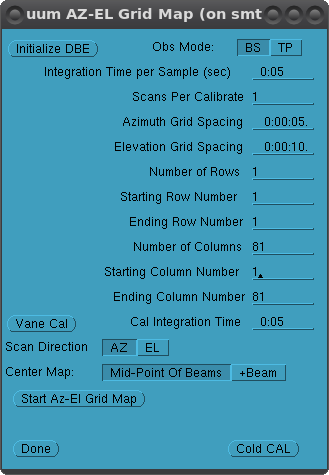
Setting up Rambo for a single slice through the source is just like setting up for a complete Az-El Gridmap. Only specify the 'Number of rows' to be 1. You need to allow enough Columns to account for the beam separation + additional 'blank' space on both ends to allow for baseline removal.

The formula would be:

Example:
Linuxpops(C) >> double map_width
Linuxpops(C) >> double spacing
Linuxpops(C) >> mapbaselines = 12
Linuxpops(C) >> spacing = 5.0
Linuxpops(C) >> map_width = (pbeam + abs(mbeam) + (bfwhm * 2.0) + (2.0 * mapbaselines * spacing)) / spacing
Linuxpops(C) >> map_width = 79.199
Round up to the next odd number
map_width = 81

So Rambo Az-El Gridmap screen should look like this:
nutator_rambo_setup.png
Figure #12, Rambo Configuration for a single slice through Source

Be sure to select the 'BS" mode, "AZ' direction and "Mid-Point of Beams" before starting observations.