Focus
The focus command is meant to analyze historical focus scans and produce a Focus v.s Elevation plot. Useful for determining the Az/NS focus model.
NOTE: The results of these procedures are residuals to the model; they need to be added/subtracted to the current telescope models in use at the time of observations.
Synopsis
Focus Analysis Functions
Usage: focus [options]
options are:
/d Re-Display Focus Array
/f Find and List Available Focus Scans
/g Perform a 'fit' to the Focus Array
/l List Loaded Focus Fits
/n Display Focus Array (No Lines)
/r Read in and Analyze All Selected Axial Focus Scans
/n Read in and Analyze All Selected NSFC Focus Scans
/h help
See Also:
See Variable: focus_lower_limit, focus_cnterr_limit, focus_freq_upper, focus_freq_lower, focus_center_diff
Example
You first need to set your search criteria. All the normal search criteria function as usual with a few extras
If you only want to analyze a single frequency, then set freq & delfreq like normal. But, is you want to analyze all frequencies in a certain band, then set freq * and then set focus_freq_lower & focus_freq_upper to encompass the frequency range of interest.
Additionally, you can set lower limits of Tmb, in Kelvins, using focus_lower_limit. You can also set the noise limit of the Gaussian fix center error by setting focus_cnterr_limit.
Lastly, you can specify a maximum Gaussian_fit to Focus_input difference using: focus_center_diff i.e, if the Gaussian Center fit is more than focus_center_diff from the initial Focus input, then reject it.
NOTE: These variables have no effect unless Non-Zero.
Once we have the search criteria set it's time to find and load all focus scans:
Linuxpops(
C) >> #
doFocus(): Reading in Focus Scans
Linuxpops(
C) >> # Processing Continuum Focus, Scan 21.01
Linuxpops(
C) >> # Max value = 0.179142
Linuxpops(
C) >> # Guess: Center = 0.179142 @ 2.950000: width = 3.500000, dlen = 9
Linuxpops(
C) >> # 9-Point Gaussian Fit: Y = 0.18, X = 2.55, BW = 2.55
Linuxpops(
C) >> # Processing Continuum Focus, Scan 21.02
Linuxpops(
C) >> # Max value = 0.172535
Linuxpops(
C) >> # Guess: Center = 0.172535 @ 2.950000: width = 3.500000, dlen = 9
Linuxpops(
C) >> # 9-Point Gaussian Fit: Y = 0.16, X = 2.56, BW = 2.41
Linuxpops(
C) >> # Processing Continuum Focus, Scan 21.03
Linuxpops(
C) >> # Max value = 0.202215
[snip-snip]
Linuxpops(
C) >> # Focus Struct send to Xgraphic
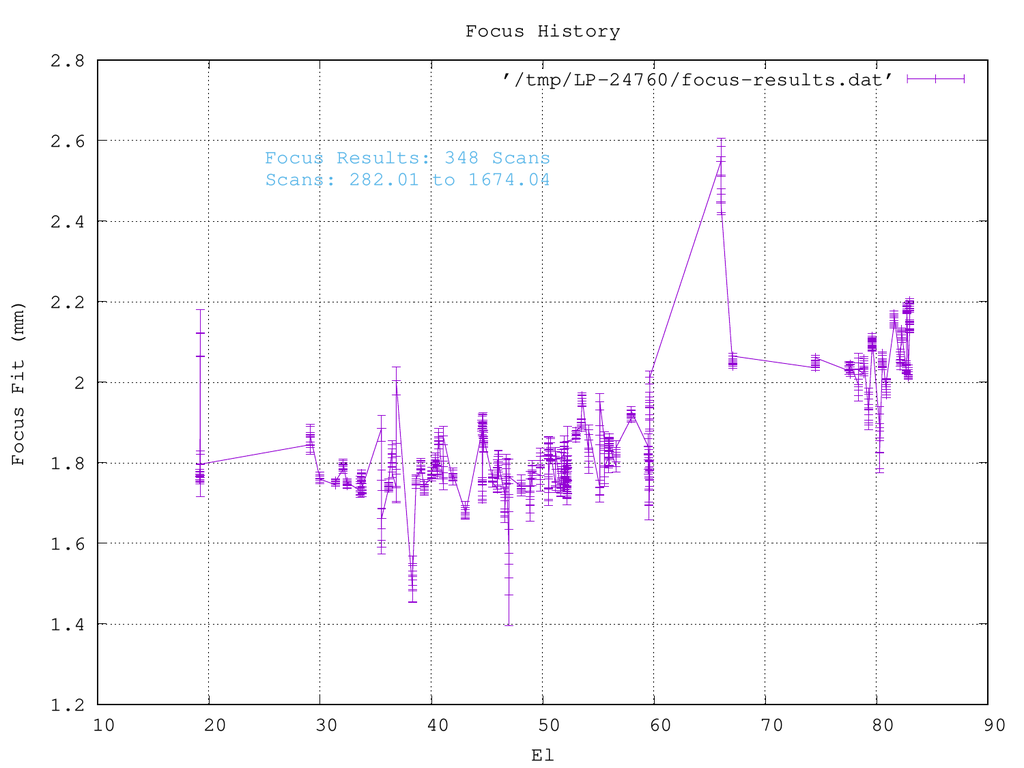
Figure 1: Plot Results of 'focus /r' Command
As can be seen, there are a few outliers in this data-set. Lets use the focus* variables to clean it up:
Lets tell Linuxpops to reject any Gaussian fit that's more that 0.25mm from the input setting, F0, and reload.
Linuxpops(
C) >> focus_center_diff = 0.25
Linuxpops(
C) >> # Setting focus_center_diff to 0.250000
[snip-snip]
Linuxpops(
C) >> # Focus Struct send to Xgraphic
As can be seen, there are now 49 fewer results,

Figure 1: Plot Results of 'focus /r' Command with Center Fitting Limit
But, we still have a couple of outliers. Lets set the lower limit of Tmb to 0.5K to eliminate the weakest of sources, and reload.
Linuxpops(
C) >> focus_lower_limit = 0.5
Linuxpops(
C) >> # Setting focus_lower_limit to 0.500000
[snip-snip]
Linuxpops(
C) >> # Focus Struct send to Xgraphic
OK, now we are getting somewhere. Lots better data with the weaker outliers missing.

Figure 1: Plot Results of 'focus /r' Command with Center Fitting Limit set to 0.25mm and Lower Tmb set to 0.5K
Fitting a Model:
Now we can fit a model to the array of points. Be sure to set nfit to the appropriate value.
Linuxpops(
C) >> #
doFocusGracefit(): Fitting a 2 order LSQ to Loaded Focus Scans
Linuxpops(
C) >> # a0 = 1.7286e+00 a1 = -6.0130e-04 a2 = 6.1528e-05
Linuxpops(
C) >> # Focus Struct send to Xgraphic
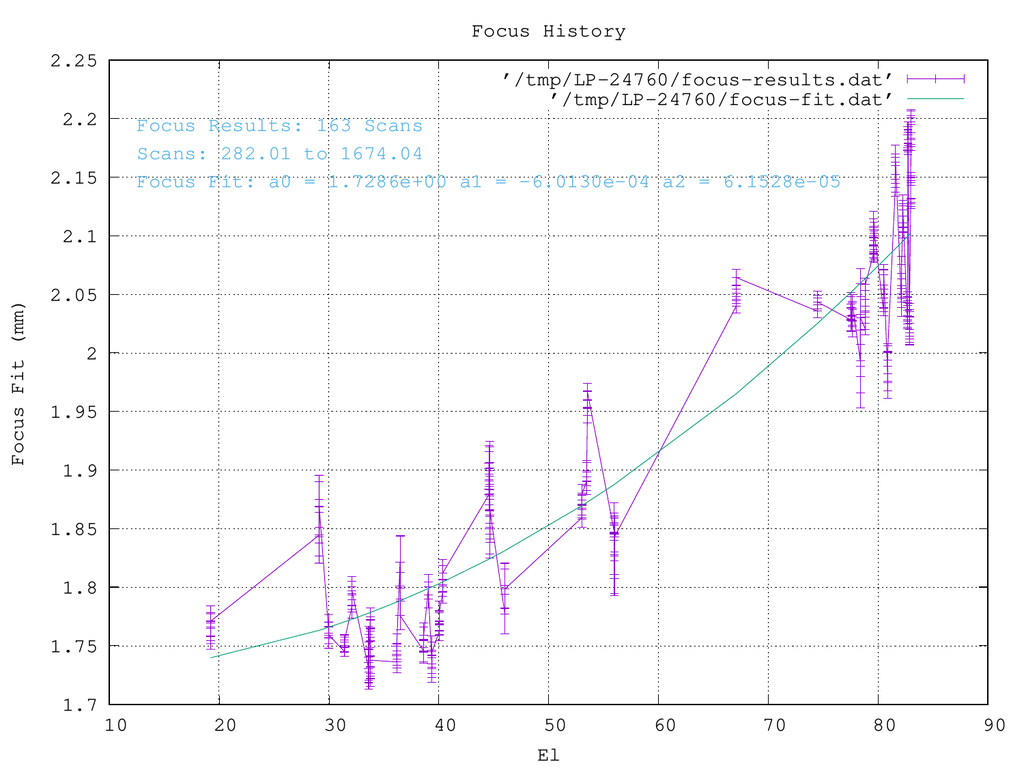
Figure 1: Plot Results of 'focus /g' Command with fitted model results show
You can also plot the results using only points and error bars.
Linuxpops(
C) >> focus /d /n
Linuxpops(
C) >> # Focus Struct send to Xgraphic

Figure 1: Plot Results of 'focus /g' Command with fitted model results show
North South Focus
These procedures work equally well with North South focuses. Just give the /n switch;
NOTE: The /n flag does double duty; Loading the NSFC scans when used with the /r flag; all other times it means plot with no-lines.
NOTE: As of this writing, May 2021, only the SMT does NS-Focuses on a routine basses.
Linuxpops(
C) >> foc /r /n
Linuxpops(
C) >> #
doFocus(): Reading in Focus Scans
Linuxpops(
C) >> # Processing Continuum NS-Focus, Scan 7280.01
Linuxpops(
C) >> # Max value = 93.861786
Linuxpops(
C) >> # Guess: Center = 93.861786 @ -1.476000: width = 4.550000, dlen = 9
Linuxpops(
C) >> # 9-Point Gaussian Fit: Y = 93.88, X = -1.55, BW = 7.25
Linuxpops(
C) >> # Processing Continuum NS-Focus, Scan 7280.02
Linuxpops(
C) >> # Max value = 97.080444
[snip-snip]
Linuxpops(
C) >> # dofocusSort(): Sorting 79 elements
Linuxpops(
C) >> # Focus Struct send to Xgraphic

Figure 1: Results of 'focus /r /n' Command of NS-Focus Scans, with fitted model results shown
Extra Commands
A few extra utility commands:
Listing:
Linuxpops(
C) >> #
doFocus(): Listing Loaded Focus Scans
Num Source Scan Freq Elev Peak F0 Fit Diff Center-Err
0: Saturn 282.01 215.100 19.20 17.86 1.743 1.758 -0.015 0.011167
1: Saturn 282.02 227.100 19.20 18.75 1.743 1.765 -0.022 0.013263
2: Saturn 282.03 215.100 19.20 17.92 1.743 1.766 -0.023 0.011408
3: Saturn 282.04 227.100 19.20 18.84 1.743 1.771 -0.028 0.013183
4: Jupiter 1344.01 215.100 29.09 71.02 1.823 1.844 -0.021 0.024015
5: Jupiter 1344.02 227.100 29.09 72.01 1.823 1.864 -0.041 0.026132
6: Jupiter 1344.03 215.100 29.09 71.22 1.823 1.851 -0.028 0.024114
7: Jupiter 1344.04 227.100 29.09 72.26 1.823 1.869 -0.046 0.026146
8: Mars 2395.01 215.100 29.97 2.41 1.783 1.761 0.022 0.009075
9: Mars 2395.02 227.100 29.97 2.59 1.783 1.766 0.017 0.010169
10: Mars 2395.03 215.100 29.97 2.42 1.783 1.757 0.026 0.009147
11: Mars 2395.04 227.100 29.97 2.59 1.783 1.759 0.024 0.011211
12: Mars 149.01 215.100 31.41 2.81 1.761 1.745 0.016 0.004036
13: Mars 149.02 227.100 31.41 3.02 1.761 1.753 0.008 0.004468
14: Mars 149.03 215.100 31.41 2.81 1.761 1.749 0.012 0.004462
15: Mars 149.04 227.100 31.41 3.02 1.761 1.755 0.006 0.004550
16: Saturn 863.01 215.100 32.09 17.91 1.798 1.784 0.014 0.010594
17: Saturn 863.02 227.100 32.09 18.91 1.798 1.793 0.005 0.012134
[snip-snip]
150: Mars 1678.04 227.100 82.71 2.60 2.203 2.193 0.010 0.004320
151: Mars 337.01 215.100 82.84 2.46 1.800 2.012 -0.212 0.005221
152: Mars 337.02 227.100 82.84 2.62 1.800 2.030 -0.230 0.005136
153: Mars 337.03 215.100 82.84 2.49 1.800 2.014 -0.214 0.005434
154: Mars 337.04 227.100 82.84 2.66 1.800 2.037 -0.237 0.005603
155: Mars 1358.01 215.100 82.96 2.31 2.000 2.128 -0.128 0.003467
156: Mars 1358.02 227.100 82.96 2.47 2.000 2.147 -0.147 0.004153
157: Mars 1358.03 215.100 82.96 2.32 2.000 2.127 -0.127 0.004180
158: Mars 1358.04 227.100 82.96 2.48 2.000 2.150 -0.150 0.004517
159: Mars 1674.01 215.100 82.98 2.33 2.100 2.182 -0.082 0.005657
160: Mars 1674.02 227.100 82.98 2.49 2.100 2.200 -0.100 0.005942
161: Mars 1674.03 215.100 82.98 2.35 2.100 2.178 -0.078 0.005041
162: Mars 1674.04 227.100 82.98 2.51 2.100 2.202 -0.102 0.005380
Searching:
You can list potential focus scans in the data file, all that meet the criteria, with the exception of any Gaussian fitting limits, by the /f flag.
Linuxpops(
C) >> #
doFocus(): Listing Available Focus Scans in file
Source Freq UT-Date UTC Scan# NS Time Az El
Mode SB BKend Tsys Tcal
Jupiter 214.100000 2018.0504 7.73 7278.01 18 360 181.7 41.1 CONTFOC
H-
LSB D4G-HL 286 320
Jupiter 228.100000 2018.0504 7.73 7278.02 18 360 181.7 41.1 CONTFOC
H-
USB D4G-HU 284 320
Jupiter 214.100000 2018.0504 7.73 7278.03 18 360 181.7 41.1 CONTFOC V-
LSB D4G-VL 297 321
Jupiter 228.100000 2018.0504 7.73 7278.04 18 360 181.7 41.1 CONTFOC V-
USB D4G-VU 316 323
Jupiter 214.100000 2018.0504 7.80 7280.01 18 360 183.1 41.0 CONTNSFC
H-
LSB D4G-HL 288 321
Jupiter 228.100000 2018.0504 7.80 7280.02 18 360 183.1 41.0 CONTNSFC
H-
USB D4G-HU 287 321
Jupiter 214.100000 2018.0504 7.80 7280.03 18 360 183.1 41.0 CONTNSFC V-
LSB D4G-VL 300 322
Jupiter 228.100000 2018.0504 7.80 7280.04 18 360 183.1 41.0 CONTNSFC V-
USB D4G-VU 319 324
Saturn 214.100000 2018.0504 9.89 7333.01 18 360 159.1 32.1 CONTFOC
H-
LSB D4G-HL 276 317
Saturn 228.100000 2018.0504 9.89 7333.02 18 360 159.1 32.1 CONTFOC
H-
USB D4G-HU 274 317
Saturn 214.100000 2018.0504 9.89 7333.03 18 360 159.1 32.1 CONTFOC V-
LSB D4G-VL 292 319
Saturn 228.100000 2018.0504 9.89 7333.04 18 360 159.1 32.1 CONTFOC V-
USB D4G-VU 307 320
Saturn 214.100000 2018.0504 9.96 7335.01 18 360 160.3 32.5 CONTNSFC
H-
LSB D4G-HL 276 318
Saturn 228.100000 2018.0504 9.96 7335.02 18 360 160.3 32.5 CONTNSFC
H-
USB D4G-HU 274 317
Saturn 214.100000 2018.0504 9.96 7335.03 18 360 160.3 32.5 CONTNSFC V-
LSB D4G-VL 292 319
Saturn 228.100000 2018.0504 9.96 7335.04 18 360 160.3 32.5 CONTNSFC V-
USB D4G-VU 307 320
[snip-snip]
G34.3 215.100000 2021.0418 11.03 9364.01 18 360 143.2 52.7 CONTFOC
H-
LSB D4G-HL 269 343
G34.3 227.100000 2021.0418 11.03 9364.02 18 360 143.2 52.7 CONTFOC
H-
USB D4G-HU 265 342
G34.3 215.100000 2021.0418 11.03 9364.03 18 360 143.2 52.7 CONTFOC V-
LSB D4G-VL 302 348
G34.3 227.100000 2021.0418 11.03 9364.04 18 360 143.2 52.7 CONTFOC V-
USB D4G-VU 322 351
Mars 227.100000 2021.0421 0.86 9418.01 18 360 255.6 67.7 CONTFOC
H-
LSB D4G-HL 238 327
Mars 239.100000 2021.0421 0.86 9418.02 18 360 255.6 67.7 CONTFOC
H-
USB D4G-HU 251 329
Mars 227.100000 2021.0421 0.86 9418.03 18 360 255.6 67.7 CONTFOC V-
LSB D4G-VL 257 329
Mars 239.100000 2021.0421 0.86 9418.04 18 360 255.6 67.7 CONTFOC V-
USB D4G-VU 309 335
Mars 227.100000 2021.0421 0.94 9420.01 18 360 256.8 66.8 CONTNSFC
H-
LSB D4G-HL 242 329
Mars 239.100000 2021.0421 0.94 9420.02 18 360 256.8 66.8 CONTNSFC
H-
USB D4G-HU 255 331
Mars 227.100000 2021.0421 0.94 9420.03 18 360 256.8 66.8 CONTNSFC V-
LSB D4G-VL 261 331
Mars 239.100000 2021.0421 0.94 9420.04 18 360 256.8 66.8 CONTNSFC V-
USB D4G-VU 314 337
Linuxpops(
C) >> # Found 348 Focus scans meeting criteria
Placing the Labels:
You can use the mouse to better place the Fit labels within the plot.
Linuxpops(
C) >> # Focus Struct send to Xgraphic
Linuxpops(
C) >> # Click Mouse to Place Labels
Linuxpops(
C) >> # Focus Struct send to Xgraphic
When happy with the plot, you can make a PDF or PNG file; or both...
Linuxpops(
C) >>
make /c /g /d
Linuxpops(
C) >> #
printPlot(): Converting plotfile /tmp/LP-12978/ccal_plot.ps to NSFC-9420.04-Mars.pdf
Linuxpops(
C) >> # printPlot(): Converting plotfile NSFC-9420.04-Mars.pdf to NSFC-9420.04-Mars.png
Linuxpops(
C) >> # printPlot(): Converting image for Publication
You can then move the resulting file to whatever you wish to call it.
Linuxpops(
C) >> mv NSFC-9420.04-Mars.png ns-fitted-plot.png
 1.8.5
1.8.5 
