|
Linuxpops
3.01.04
Spectral Anaysis Package for Single Dish Data
|
|
Linuxpops
3.01.04
Spectral Anaysis Package for Single Dish Data
|
Telescope beam efficiencies can be measured using both Spectral line and Continuum data analysis.
Once one has taken a series of 'sequence' scans on a planet or strong Quasar, it's possible to use those scans to determine the telescope beam efficiency at the frequency of the observation. Several scripts are provided to perform these tasks.
Since 2008 at the SMT and 2019 at the 12M, the continuum system has been producing 4 IFs' worth of results: H-LSB, H-USB, V-LSB & V-USB, in that order with the resulting scan numbers of: xxx.01, xxx.02, xxx.03 & xxx.04; this numbering is fixed in the resultant sdd datafile.
The following commands only work in mode CONT and with your environment set up to point to the proper datafile. (See below section on Spectral Line Beam efficiency measurements) If the scans were taken earlier and there has been a new datafile version created, then you will need to change the version via the fver xxx command or the version command which pops up a window to select the proper version.
A note about DSB receivers. The user must be very mindful of attempting to analyze Sequences taken with DSB receivers. Because there are no rejections of the opposite sideband, there may be unknown image contributions added to the sky signal. It is best to only attempt these procedures when the bandpass response and atmospheric contributions are similar for both sidebands. (See the section on the ATM Command))

'beff' is the simplest command when you have measured just 2 rejections.
> beff bscan escan rej1 rej2
where bscan is the first 'seq' scan, escan is the last 'seq' scan, rej1 is the H-POL rejection and rej2 is the V-POL rejection.
The script will automatically determine the frequency and source of the observations.
> beff 4015 4023 20 21
produces a flurry of messages and a plot that looks like this:
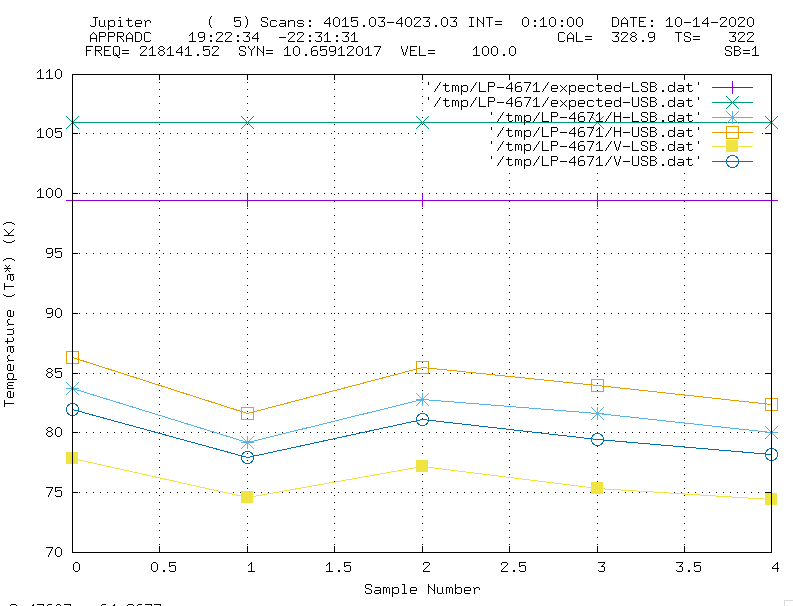
The script reduced both the USB and LSB scans for both H-POL and V-POL. There are also horizontal lines indicating the expected Tmb of the upper and lower frequencies.
In addition, there is a summary printout indicating the results.
    Linuxpops(C) >>  # Object Jupiter
    Linuxpops(C) >>  # Set[ 0]: ( 5) Scans: (4015.03-4023.03); Date: 2020.1014, 23.45 UT; El = 29.4
    Linuxpops(C) >>  #                    H-LSB      H-USB      V-LSB      V-USB
    Linuxpops(C) >>  #      Rejections:  20.000     20.000     21.000     21.000
    Linuxpops(C) >>  #      Rejs Coeff:  99.010     99.010     99.212     99.212
    Linuxpops(C) >>  #             Tmb:  81.318     83.770     75.789     79.591
    Linuxpops(C) >>  #    Expected Tmb:  99.424    105.998     99.424    105.998
    Linuxpops(C) >>  #        TmbSigma:   1.864      1.981      1.565      1.768
    Linuxpops(C) >>  #        Beam Eff:  80.979     78.248     75.627     74.495
    Linuxpops(C) >>  #  Beam Eff Sigma:   1.857      1.850      1.562      1.655
    Linuxpops(C) >>  # ------------------Ignore Below Here----------------------
    Linuxpops(C) >>  #            Flux: 2858.96    2945.19    2664.59    2798.24
    Linuxpops(C) >>  #   Expected Flux: 4386.33    4676.30    4386.33    4676.30
    Linuxpops(C) >>  #       FluxSigma:   65.55      69.64      55.02      62.16
    Linuxpops(C) >>  #        Beam Eff:   64.53      62.36      60.27      59.37
    Linuxpops(C) >>  #
If the operator measured all 4 rejections, you can use the function, beff4r:
> beff4r 3600 3608 19 17 17 17
produces a flurry of messages and a plot that looks like this:
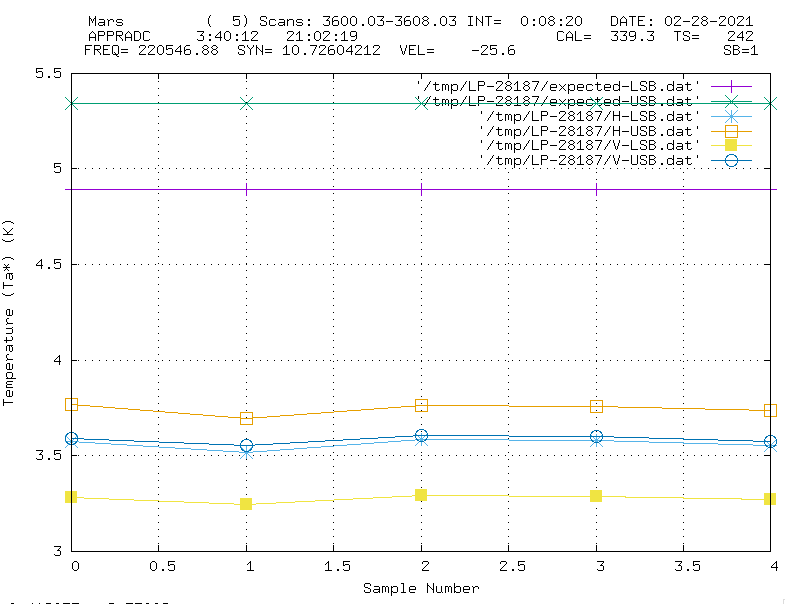
The script reduced both the USB and LSB scans for both H-POL and V-POL applying 4 separate rejections. There are also horizontal lines indicating the expected Tmb of the upper and lower frequencies.
In addition, there is a summary printout indicating the results.
    Linuxpops(C) >>  # Object Mars
    Linuxpops(C) >>  # Set[ 0]: ( 5) Scans: (3600.03-3608.03); Date: 2021.0228, 3.78 UT; El = 45.5
    Linuxpops(C) >>  #                    H-LSB      H-USB      V-LSB      V-USB
    Linuxpops(C) >>  #      Rejections:  19.000     17.000     17.000     17.000
    Linuxpops(C) >>  #      Rejs Coeff:  98.757     98.044     98.044     98.044
    Linuxpops(C) >>  #             Tmb:   3.561      3.744      3.275      3.585
    Linuxpops(C) >>  #    Expected Tmb:   4.891      5.342      4.891      5.342
    Linuxpops(C) >>  #        TmbSigma:   0.029      0.031      0.019      0.023
    Linuxpops(C) >>  #        Beam Eff:  71.908     68.710     65.645     65.796
    Linuxpops(C) >>  #  Beam Eff Sigma:   0.578      0.569      0.374      0.418
    Linuxpops(C) >>  # ------------------Ignore Below Here----------------------
    Linuxpops(C) >>  #            Flux:  125.21     131.62     115.14     126.04
    Linuxpops(C) >>  #   Expected Flux:  215.79     235.67     215.79     235.67
    Linuxpops(C) >>  #       FluxSigma:    1.01       1.09       0.66       0.80
    Linuxpops(C) >>  #        Beam Eff:   57.31      54.76      52.31      52.43
    Linuxpops(C) >>  #
Just remember to give the rejections in the order: H-LSB H-USB V-LSB V-USB
Sometime it is desirable to only analyze either of the USB of LSB results; say when there are issues with one polarization or the other. In these cases you can use beffu or beffl
> beffu bscan escan rej1 rej2
where bscan is the first 'seq' scan, escan is the last 'seq' scan, rej1 is the H-POL rejection and rej2 is the V-POL rejection.
Again, the script will automatically determine the frequency and source of the observations.
> beffu 4757 4767 20 21
produces a flurry of messages and a plot that looks like this:
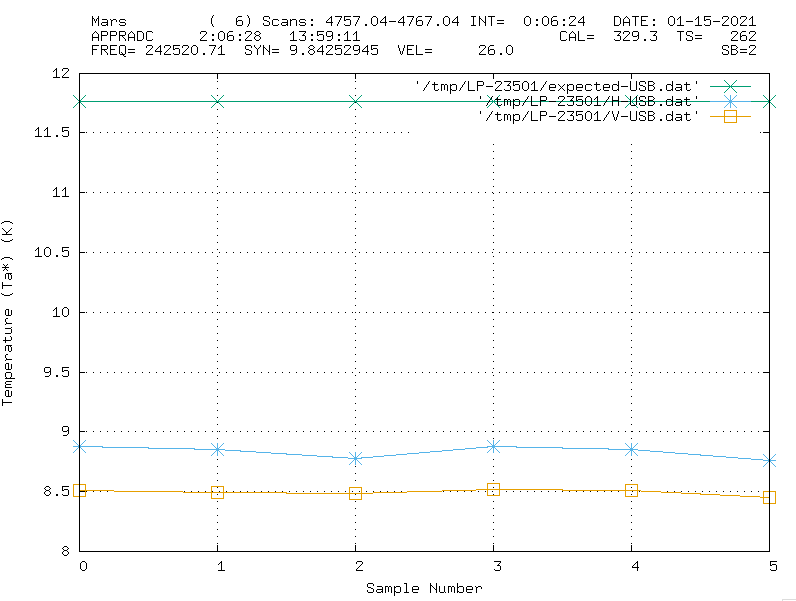
The script reduced only the USB scans for both H-POL and V-POL. There is also a horizontal line indicating the expected Tmb of the upper frequencies.
In addition, there is a summary printout indicating the results.
    Linuxpops(C) >>  # Object Mars
    Linuxpops(C) >>  # Set[ 0]: ( 6) Scans: (4757.04-4767.04); Date: 2021.0115, 22.34 UT; El = 39.3
    Linuxpops(C) >>  #                    H-LSB      H-USB      V-LSB      V-USB
    Linuxpops(C) >>  #      Rejections:  20.000     20.000     21.000     21.000
    Linuxpops(C) >>  #      Rejs Coeff:  99.010     99.010     99.212     99.212
    Linuxpops(C) >>  #             Tmb:   0.000      8.831      0.000      8.493
    Linuxpops(C) >>  #    Expected Tmb:   0.000     11.761      0.000     11.761
    Linuxpops(C) >>  #        TmbSigma:   0.000      0.051      0.000      0.026
    Linuxpops(C) >>  #        Beam Eff:   0.000     74.345      0.000     71.639
    Linuxpops(C) >>  #  Beam Eff Sigma:   0.000      0.431      0.000      0.222
    Linuxpops(C) >>  # ------------------Ignore Below Here----------------------
    Linuxpops(C) >>  #            Flux:    0.00     310.49       0.00     298.58
    Linuxpops(C) >>  #   Expected Flux:    0.00     518.87       0.00     518.87
    Linuxpops(C) >>  #       FluxSigma:    0.00       1.80       0.00       0.93
    Linuxpops(C) >>  #        Beam Eff:    0.00      59.25       0.00      57.09
    Linuxpops(C) >>  #
as can be seen, only the USB column results have been populated.
The beffl command produces similar results for the LSB.
A special situation exists at the SMT where the Band-7 receiver only has 2 IFs' of output and the engineers have plumbed those signals into the USB ports of the backend hardware. So, the DBE continuum system will be configured to only write out sub-scans xxx.02 & xxx.04 regardless of the observational sideband configuration. This presents some problems with the automatic identification features of LinuxPops. Just remember that the script beffu will alway go straight for IFs' 2 & 4, so, this shouldn't present a problem.
Just remember when using beffu for DSB receivers to pass 0's for rejections and the results should be OK.
> beff 4256 4264 0 0
will produce a plot like this:
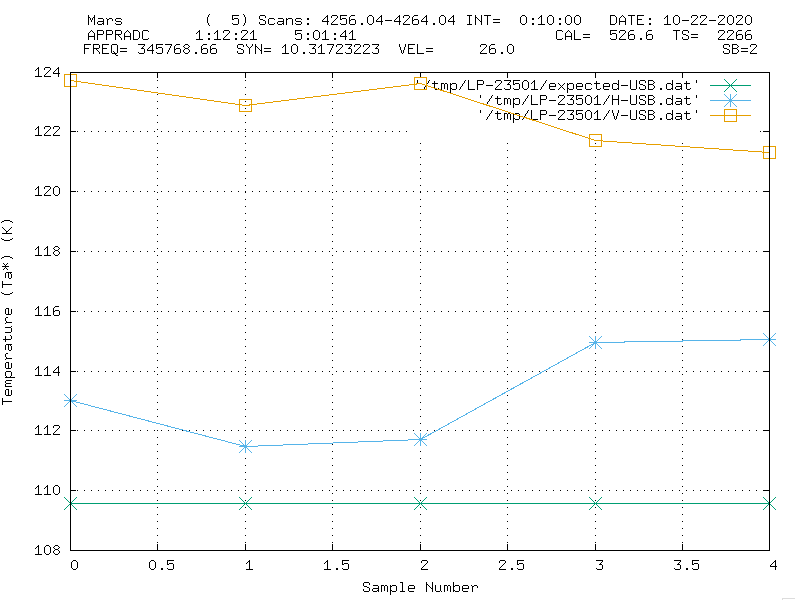
In addition, there is a summary printout indicating the results.
    Linuxpops(C) >>  # Object Mars
    Linuxpops(C) >>  # Set[ 0]: ( 5) Scans: (4256.04-4264.04); Date: 2020.1022, 5.46 UT; El = 58.2
    Linuxpops(C) >>  #                    H-LSB      H-USB      V-LSB      V-USB
    Linuxpops(C) >>  #      Rejections:   0.000      0.000      0.000      0.000
    Linuxpops(C) >>  #      Rejs Coeff:  50.000     50.000     50.000     50.000
    Linuxpops(C) >>  #             Tmb:   0.000    113.240      0.000    122.653
    Linuxpops(C) >>  #    Expected Tmb:   0.000    109.560      0.000    109.560
    Linuxpops(C) >>  #        TmbSigma:   0.000      1.715      0.000      1.093
    Linuxpops(C) >>  #        Beam Eff:   0.000     51.680      0.000     55.975
    Linuxpops(C) >>  #  Beam Eff Sigma:   0.000      0.783      0.000      0.499
    Linuxpops(C) >>  # ------------------Ignore Below Here----------------------
    Linuxpops(C) >>  #            Flux:    0.00    3981.28       0.00    4312.22
    Linuxpops(C) >>  #   Expected Flux:    0.00    4833.27       0.00    4833.27
    Linuxpops(C) >>  #       FluxSigma:    0.00      60.29       0.00      38.44
    Linuxpops(C) >>  #        Beam Eff:    0.00      41.19       0.00      44.61
    Linuxpops(C) >>  #
Please note that the computed Tmb will be shown ~twice as high as it should be due to the DSB nature of the receiver. The Beam Efficiency results quoted are corrected by the Rejection Coeff of 50%.
There is one additional procedure you can try. befd, will walk you through the steps to locate and process continuum sequences. Especially good for when you can't quite remember the scan numbers, but you are positive you took some measurements. Again, you may need to change data-file versions to find older measurements.
NOTE: There is a convenience function called: findseq that will search out all sequence scans in the currently selected observer datafiles and list the number found. If you select one of these files, it will become the current working datafile.
NOTE: The following popup windows can take time to come up if you are running this on modelo or smtoast and you are sitting at home / office.
Example:
> befd Mars <cr>
This procedure will search for all continuum sequences in the current file taken on the source specified. It will then open a window to allow you to select the first scan. This pop-up window will list all available sequence scans including the sub-scans to allow you to select the USB or LSB scan. More on this later.
NOTE: Make note of the number of sub-scans available during the first scan selection phase. Are there 2 or 4 IFs' worth of scans and if there are only 2, what are the sub-scans numbers?
Here is what the popup should look like:
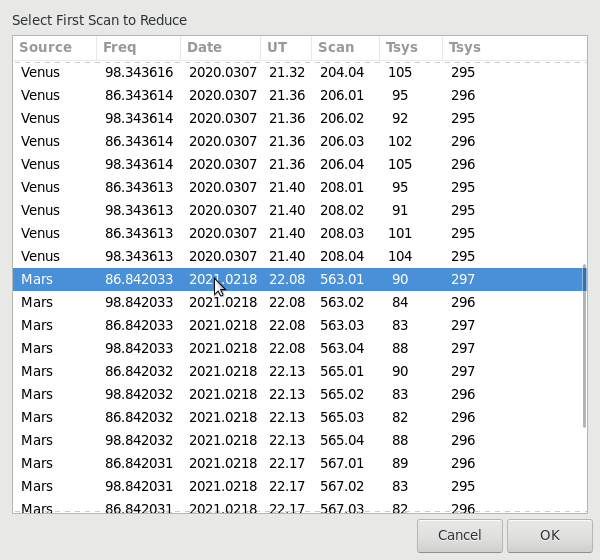
Note that there are 4 IFs' worth of data.
Once the first scan is selected the procedure will determine the source name and frequency you selected and then present another popup containing only scans that match, starting with the first one you selected.
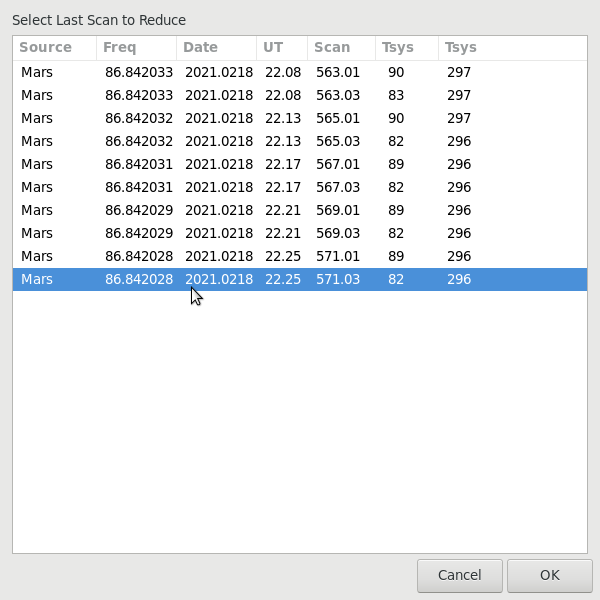
OK, now that we have the source, frequency, first and last scans, you need to tell the procedure what IFs' you wish to process; LSB, USB or Both. Again, another popup will allow you to designate them.
Note: Older sequences were numbers xx.01 & xx.02 back when we only had 2 IFs;. Select either 1-2 USB or 1-2 LSB in that case.
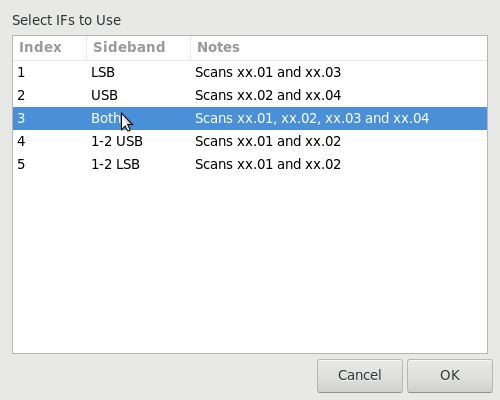
NOTE: There can be some confusion here in that when the entirety of scans were first presented in the beginning, if you selected the xxx.01 scan of a set of scans, you would think that the procedure would only process the LSB frequency of scans. You would be correct in that the 'Select the Last Scan' popup will only show the scans taken at the same frequency. This feature is necessary in the cases where there is only USB or LSB scans. If you select 'Both' in the IFs' popup, rest assured that all 4 IFs' will be searched for and processed; if they exist.
Now it's time to enter rejections measured before observation:
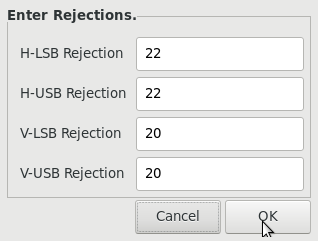
NOTE: If you selected LSB or USB in the previous popup, then this popup will only show 2 entries. If you only measured 2 rejections then repeat the H-POL rejection value in both the H-LSB & H-USB entries (as is shown here), likewise the V-POL.
Once these 4 steps have been completed the procedure has all the info it needs to process the scans. A flurry of messages should scroll by and the graphics window should show the results:
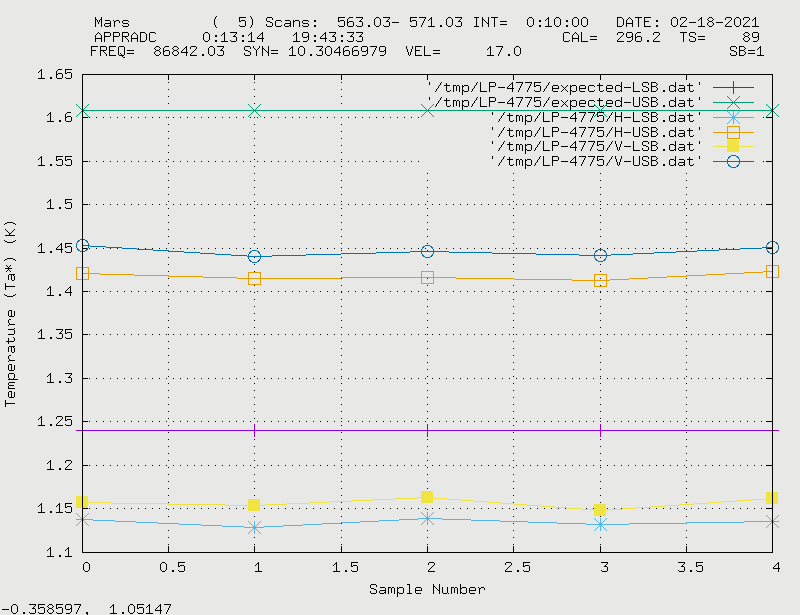
And, the usual text output showing the results:
    Linuxpops(C) >>  # Object Mars
    Linuxpops(C) >>  # Set[ 0]: ( 5) Scans: (563.03-571.03); Date: 2021.0218, 22.25 UT; El = 52.6
    Linuxpops(C) >>  #                    H-LSB      H-USB      V-LSB      V-USB
    Linuxpops(C) >>  #      Rejections:  22.000     22.000     20.000     20.000
    Linuxpops(C) >>  #      Rejs Coeff:  99.373     99.373     99.010     99.010
    Linuxpops(C) >>  #             Tmb:   1.135      1.417      1.157      1.446
    Linuxpops(C) >>  #    Expected Tmb:   1.240      1.608      1.240      1.608
    Linuxpops(C) >>  #        TmbSigma:   0.004      0.004      0.006      0.005
    Linuxpops(C) >>  #        Beam Eff:  90.910     87.574     92.373     89.036
    Linuxpops(C) >>  #  Beam Eff Sigma:   0.336      0.276      0.503      0.335
    Linuxpops(C) >>  # ------------------Ignore Below Here----------------------
    Linuxpops(C) >>  #            Flux:   27.70      34.61      28.25      35.31
    Linuxpops(C) >>  #   Expected Flux:   38.00      49.28      38.00      49.28
    Linuxpops(C) >>  #       FluxSigma:    0.10       0.11       0.15       0.13
    Linuxpops(C) >>  #        Beam Eff:   72.44      69.78      73.61      70.95
    Linuxpops(C) >>  #
If you take a series of Spectral Line scans on a planets, it is possible to reduce the data and still get Beam Efficiency.
First, set up your search criteria:
NOTE: Be sure to set up the proper baseline regions, free of any absorption lines before proceeding.
Now analyze (1) polarization at a time.
Should produce a plot like this. NOTE: Not all planets exhibit large absorption lines like Mars.
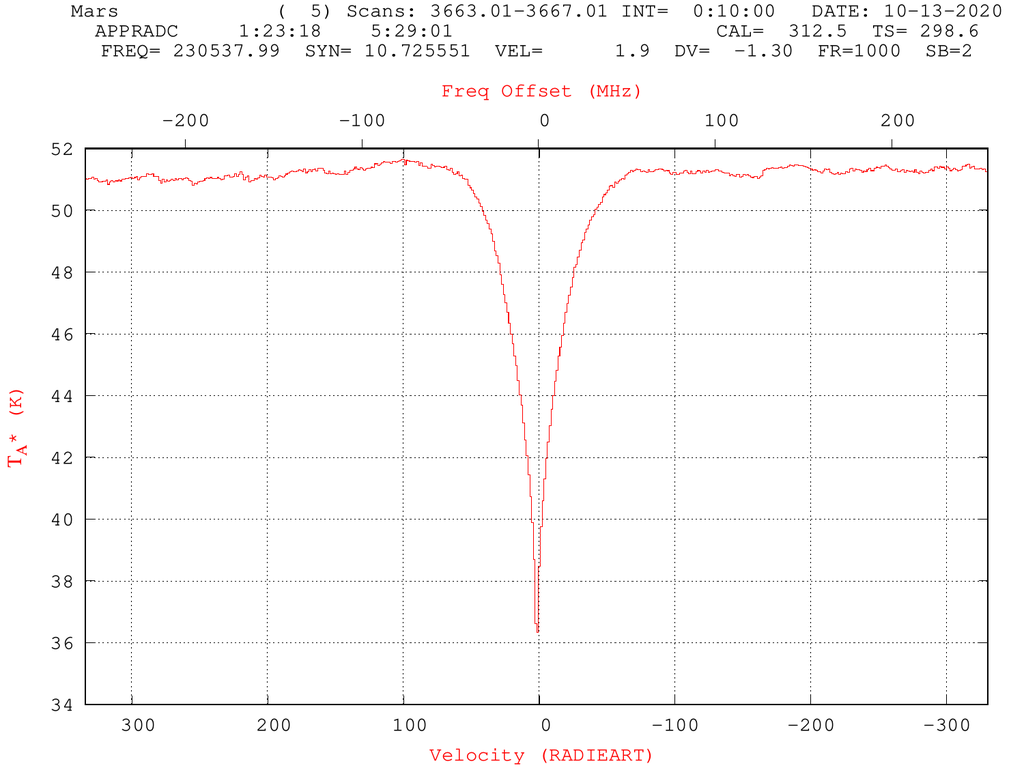
Now, just type avg /b to have Linuxpops compute average temperature of the baseline regions. It will then run the planets program and compute the beam efficiency.
Now do the same for IF #2. V-USB.
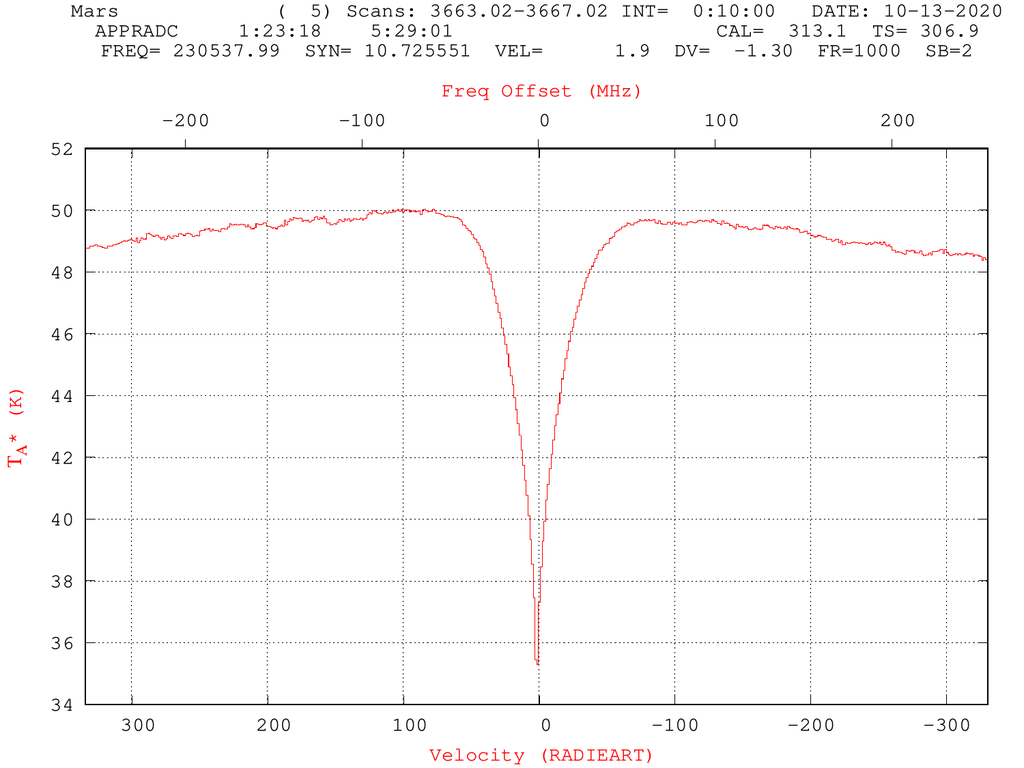
So, the results are 79.90% for H-USB & 75.92% for V-USB.
 1.8.5
1.8.5 
