|
Linuxpops
3.01.04
Spectral Anaysis Package for Single Dish Data
|
|
Linuxpops
3.01.04
Spectral Anaysis Package for Single Dish Data
|
The operations described in this chapter are very common in spectral-line. Indeed, it is a rare observation for which the observer does not need to subtract the slopes and baseline curvature impressed on his measurement by the astronomical background emission, standing waves from the telescope structure, and drifts or mismatches in the receiver system. The user must try to define `off-line' segments of a spectrum, and fit an analytic function to the data in those parts of the scan which they believe should be flat. In LinuxPops, the possibilities exist to fit either just a DC-offset, Chebyshev polynomials of up to 19th order or a running average.
The fitting of a sinusoid to handle the presence of standing waves is best done using the fft sub-system.
In defining the region over which the baseline is to be fitted for a scan held in Array (h0), two possibilities exist.
Often a spectral feature, is sufficiently localized that one can fit a baseline to just two regions, one at each end of the scan. Probably you will want to drop a few points at each end of the scan as being unreliable. In this case, you can set your baseline region via the command nbset and then clicking on the beginning and end of the area of interest; i.e. the area that there are lines present.
> nbset
then click on the plot to the left and then to the right of the area of interest.
In more complex cases, you may have several well-separated lines within the spectrum, and wish to fit the baseline to `unconfused' segments lying between these. This can be achieved for up to 64 such segments using the command 'bset'.
> bset
you will be asked for the number of baseline regions you wish to set. (up to 64)
You then proceed to click on the plot repeatedly until you have defined the left edge and right edge of each of the baseline segments you wish to define. These individual regions need not be in order left to right and each individual region need not be clicked in the order left-side right-side. Auto-sorting is used to correct this.
It is not necessary to define all baseline regions all at once. Start with a few major regions first, then later if you discover you need more, then type:
> bset /a [n]
This allows you to 'add' one additional baseline region at a time. Again, up to 64 total, or n more regions.
If you miss-place a region you do not have to start all over again; you can move either side of the box by the command bmove.
> bmove
you will asked to click on the edge of the box edge you which to move and then click where you really wanted it.
You can interactively move individual baseline regions one at a time until at which time you are satisfied with their placement. To do this type, use the bloop command.
> bloop [options]
The function will repeatedly call bmove interactively moving edges of baseline regions until you type 'q' in the terminal window, or a time-out occurs. (approximately 30 seconds)
> bloop /b or /g
If you have previously issued the bshape or gracefit commands, (see below) then the program will re-evaluate and display the baseline fitting after each move.
You may remove a single baseline region you do not want by using the bset /r command.
> bset /r
You will be prompted to click on the baseline box you want removed. (Note: It really helps if you have bmark=1 variable set.
When displaying a scan, the variable bmark is a switch which, if set to 1, permits you to draw boxes that illustrate where the most-recently computed baseline made its fit.
    > bmark=1
    > xx
The plot will now show boxes about the zero axis for all defined baseline regions.
> bmark=-1
The boxes will be places at the bottom of the plot.
Having set the region over which you wish the baseline to be fitted, a number of possibilities exist. If the scan has a rather flat baseline already, it may only be necessary to subtract a DC-offset from the scan. If so, this is most simply achieved by using the command: dcoffset.
Just type,
> dcoffset [+/-offset] [/a]
The '/a' flag will cause the DC-offset be calculated over your defined region for baseline fitting, and subtracted from the data in H0. You may also pass a 'offset' guess and it will be subtracted. Any slope or curvature on the scan will, of course, remain.
The same effect could be had by using the verb gracefit (see below), with the variable nfit set to 0, i.e.,
    > nfit=0
    > gracefit
    > rmbase
If the baseline of a scan is artificially curved, it is possible to fit a Chebyshev polynomial to those data points in H0 within the line- or source-free region and then subtract the fitted polynomial from all the data in the Array.
First, it must be decided which order of polynomial is to be fitted, and this value is set in the variable nfit. (NOTE : nfit = 0 is appropriate for a DC-offset). The command gracefit is then invoked to fit the baseline
For example, if it is necessary to fit and remove a fifth-order polynomial from a spectrum, (where the line-free region has already been defined), and the corrected scan displayed, type,
    > nfit=5
    > gracefit
You will see a blue line showing how well the fitted polynomial approximates the data. Once you are happy with the fit, you can remove the baseline with the command: rmbase.
> rmbase [/a] [/f]
where '/a' means autoscale the plot when finished, and '/f' means retain the the scale of the current yrange, but re-center the plot about the zero axis.
In the cases where there are complex problems with the baselines, there are additional tools to help correct these issues. One such command is bshape, which models the baseline regions and creates a complex array of 'fitted' data. This resulting array can then be subtracted from the data to correct the baseline.
Figure 1 shows the accumulated results of 14 scans, both polarizations, on W51M using the LINEPS mode of observing. PS mode is notorious for producing problem baselines, which is why LINEBSP mode should be utilized whenever possible. Because W51M is a complex region, the only options is PS mode.
Right away we see a couple of issues with the accumulated results. A strong DC offset and a running sine-wave throughout the bandpass.
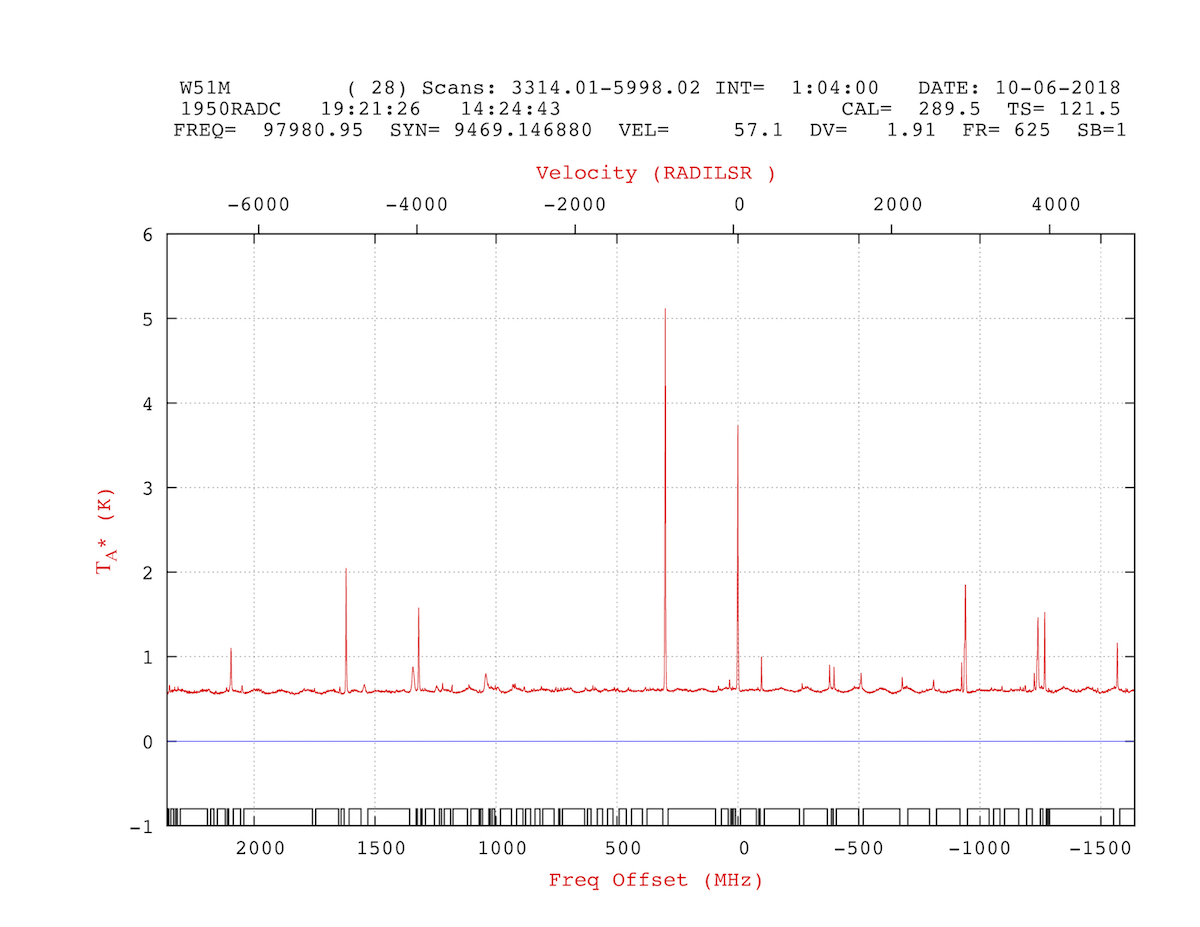
If we zoom in on the y-axis we can see the problems better:
    >
    > yrange 0 1.5
    >

Now comes the fun part; defining baselines regions. Because there are many emission lines in the bandpass, the job of defining baseline regions becomes complex. Using commands outlines above define as many baselines regions as necessary, up to 64, to describe the 'non emission' regions. It helps to zoom in to get the edges of the baseline boxes just right. Also, setting bmark=1 vs bmark=-1 can be helpful in overlaying the 'defined' regions on the plot to better facilitate this process. Figure 3 shows 56 regions defined.
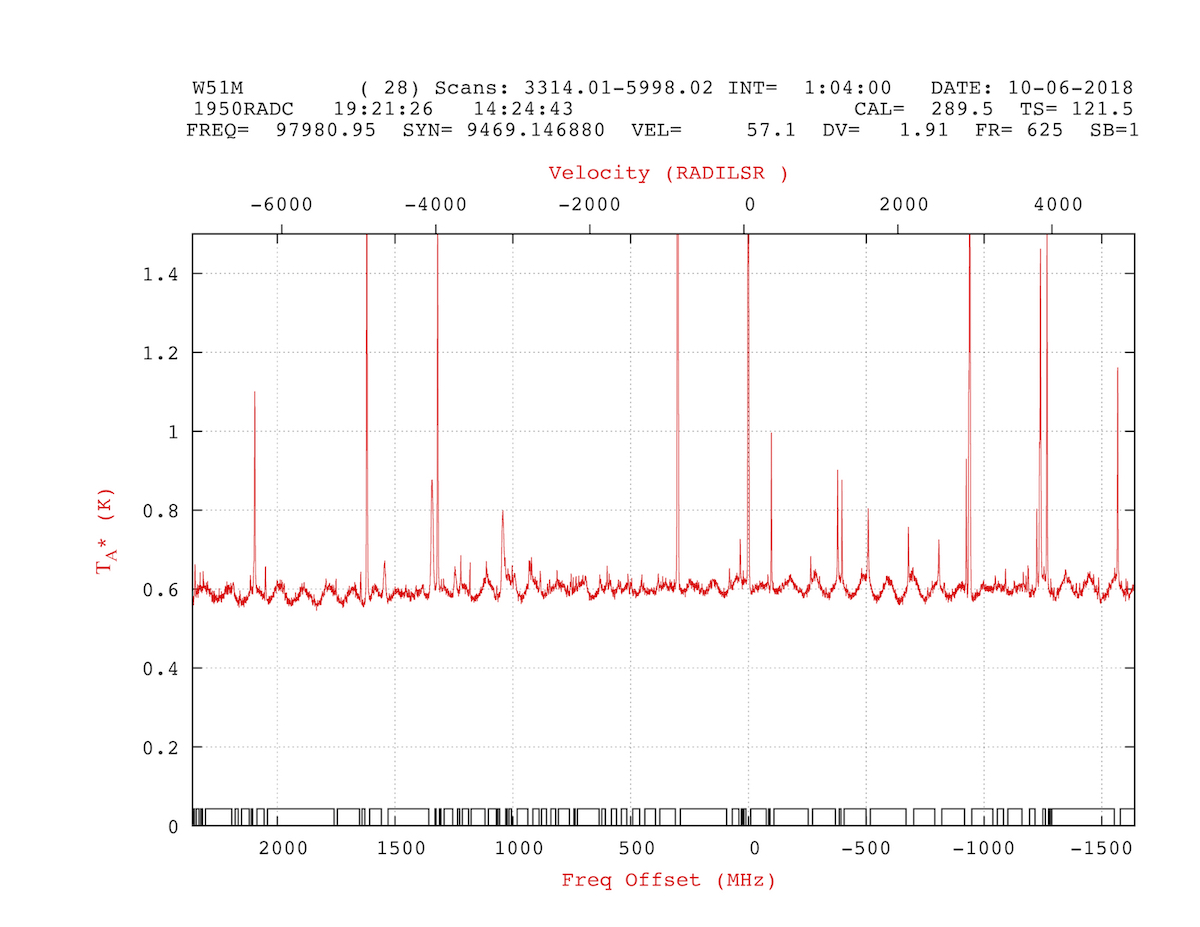
Now, lets start by removing the DC offset from the data and zooming in further.
    >
    > dcoffset /a
    > xrange -0.1 0.2
    >
The '/a' flag tell Linuxpops to use the average of the baseline regions to remove the offset. Figure 4 show the DC offset removed and further zoomed in.

Pretty ugly huh?
Now comes the magic. Using the bshape command, model the baseline regions. First set the nbshape variable. This tell Linuxpops how many channels to use in it's running average smoothing algorithm. Much like a boxcar function, but only using the defined baseline regions. Other variable that control bshape's work are bsmoothing, bleadtrail, nfit and nspline. The bsmoothing variable tell Linuxpops how to 'connect' the individual baseline regions.
bsmoothing=0 means perform a straight linear fit between regions. bsmoothing=1 means to perform a nfit polynomial curve fit between adjacent regions.
You probable want to keep the nfit rather low, say 3-4 to keep things sane.
If your first or last baseline region does not extend to the extreme left or right edge of the data, some accommodation must be performed. Use bleadtrail to tell Linuxpops what to do.
bleadtrail=0 for linear setting of the no-mans-land, leading and trailing regions bleadtrail=1 for polynomial extension of the no-mans-land, leading and trailing regions
NOTE: nspline variable only kicks in you you pass the '/s' flag to bshape; this causes an additional bspline smoothing, of nspline order, to be performed on the resulting baseline model
    >
    > nbshape = 21
    > bsmooothing = 0
    > bshape
    >
It's hard to see in this picture, but the blue line describes the fitted model; with but a few exceptions, is pretty good.

If you are completely satisfied with the model then it's time to remove the model from the data.
    >
    > rmbase
    >

We can further zoom in:
    >
    > yrange -0.05 0.1
    >

And, the final results:
    >
    > autoscale
    >
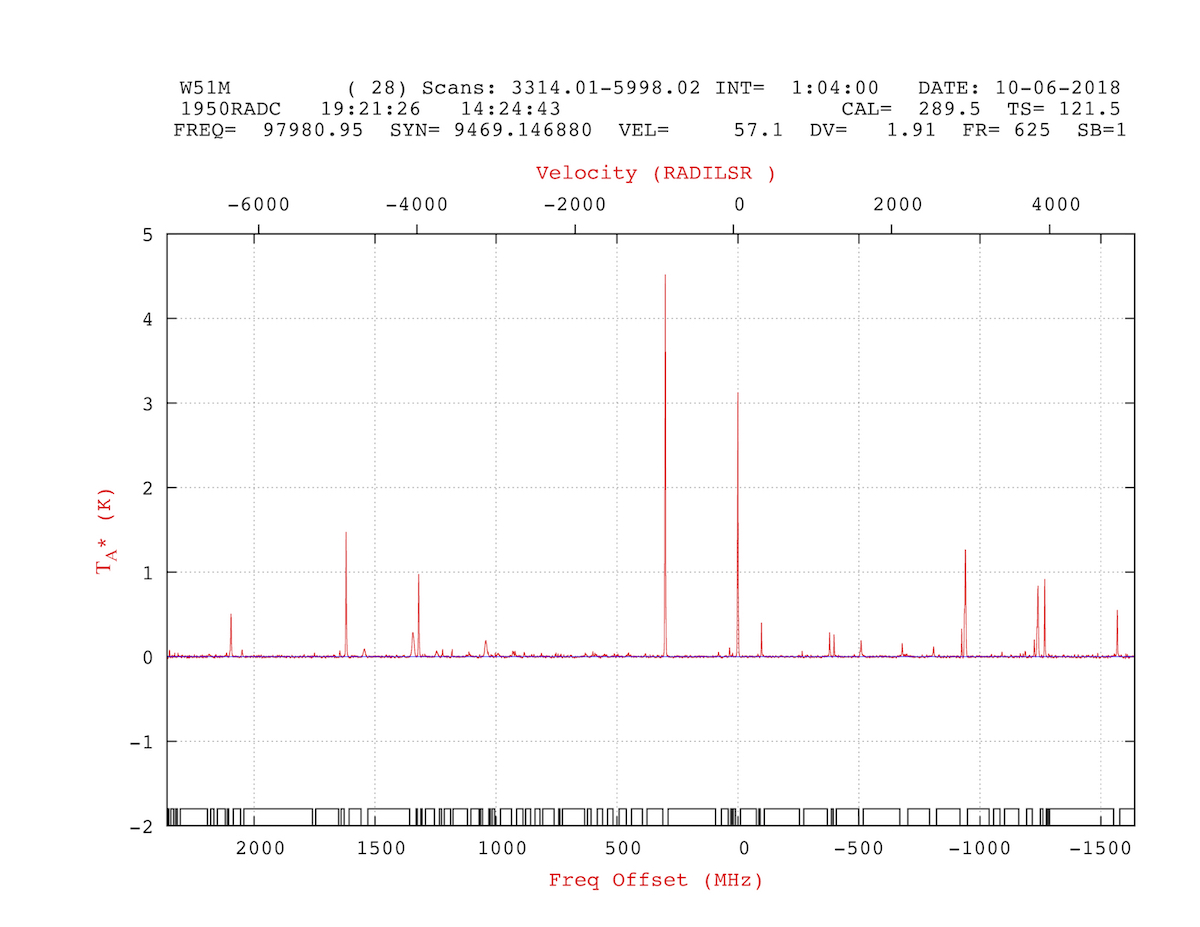
Compare to Figure 1.
Sometimes you are left with a wicked standing-wave in your accumulated data. Most of the time, as in the examples below, the phase of the standing-wave is constant, but the amplitude isn't. Simple sin wave remove becomes problematic. So, we are force to utilize more drastic steps.
NOTE: You could also try the fft procedures outlines elsewhere, but due to the large number of emission lines in this particular data set, that didn't seem to work very well.
Using the methods outlined above, we can address these issues head-on.
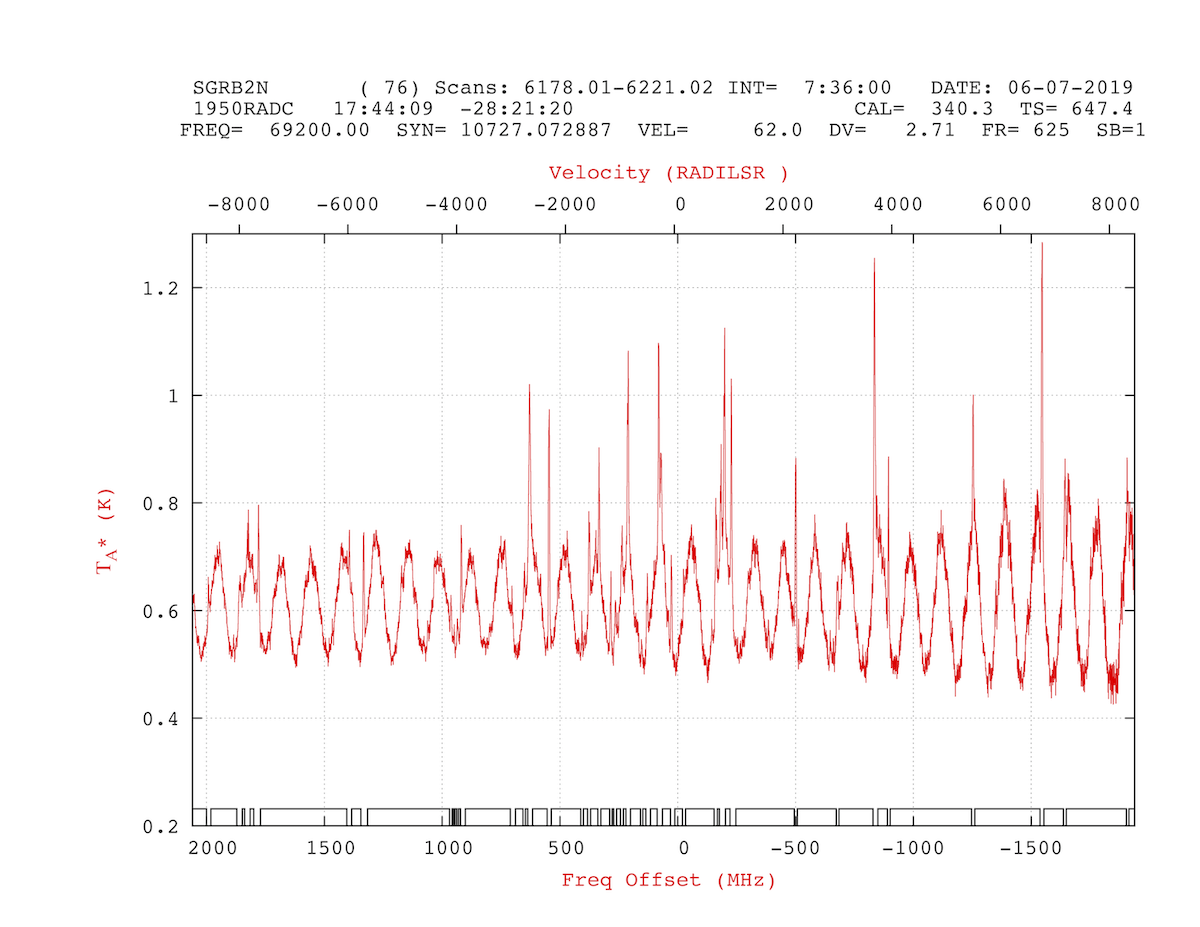
Figure 9 show the results of 7.5 hours of integration on our newly installed 4mm MRI receiver. In this case there was a mis-match between the optics and the calibration load. (Since addressed) But, there is good data to be found here; so lets find it.
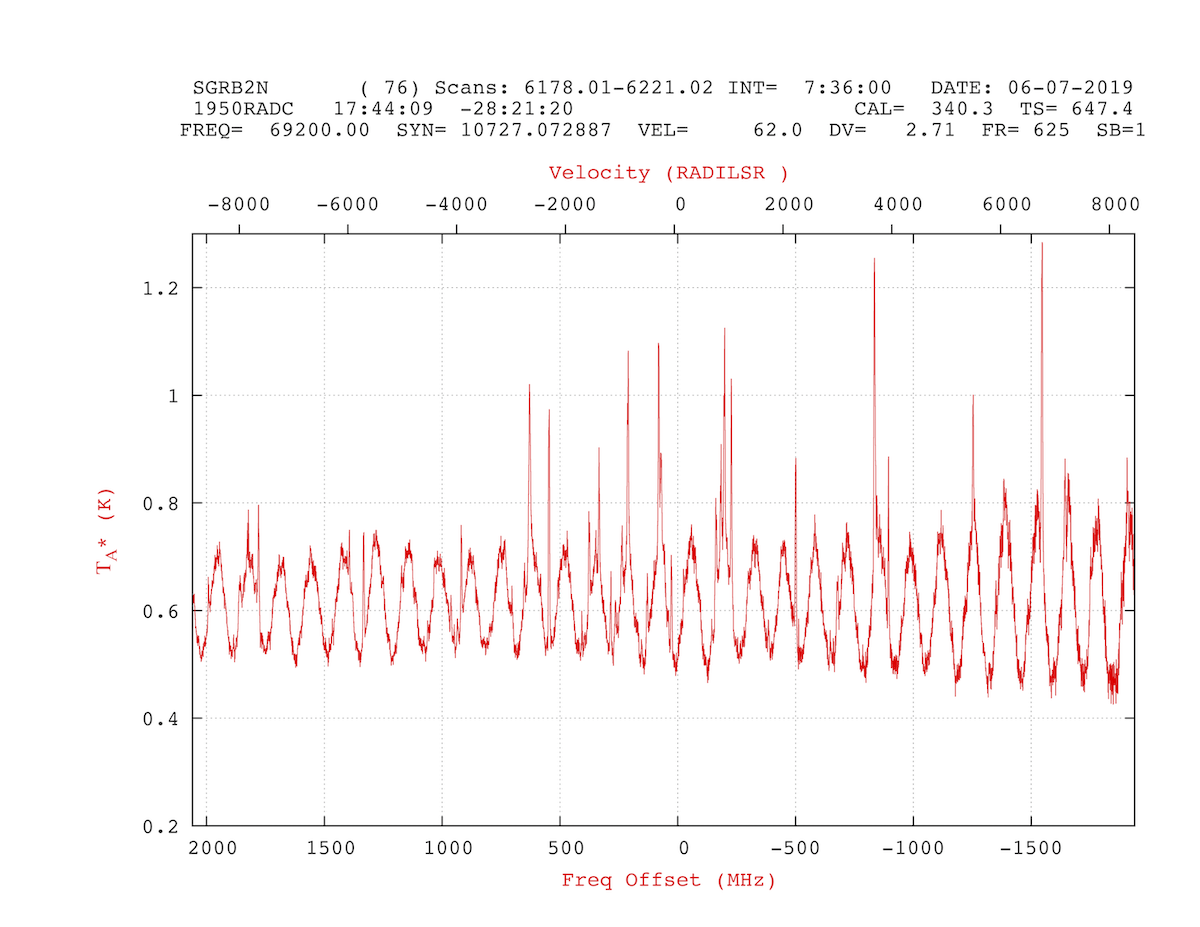
As described above, you have to carefully define the areas of the baselines with no emission lines. In this case we needed 37 separate baseline regions. See Figure 10.
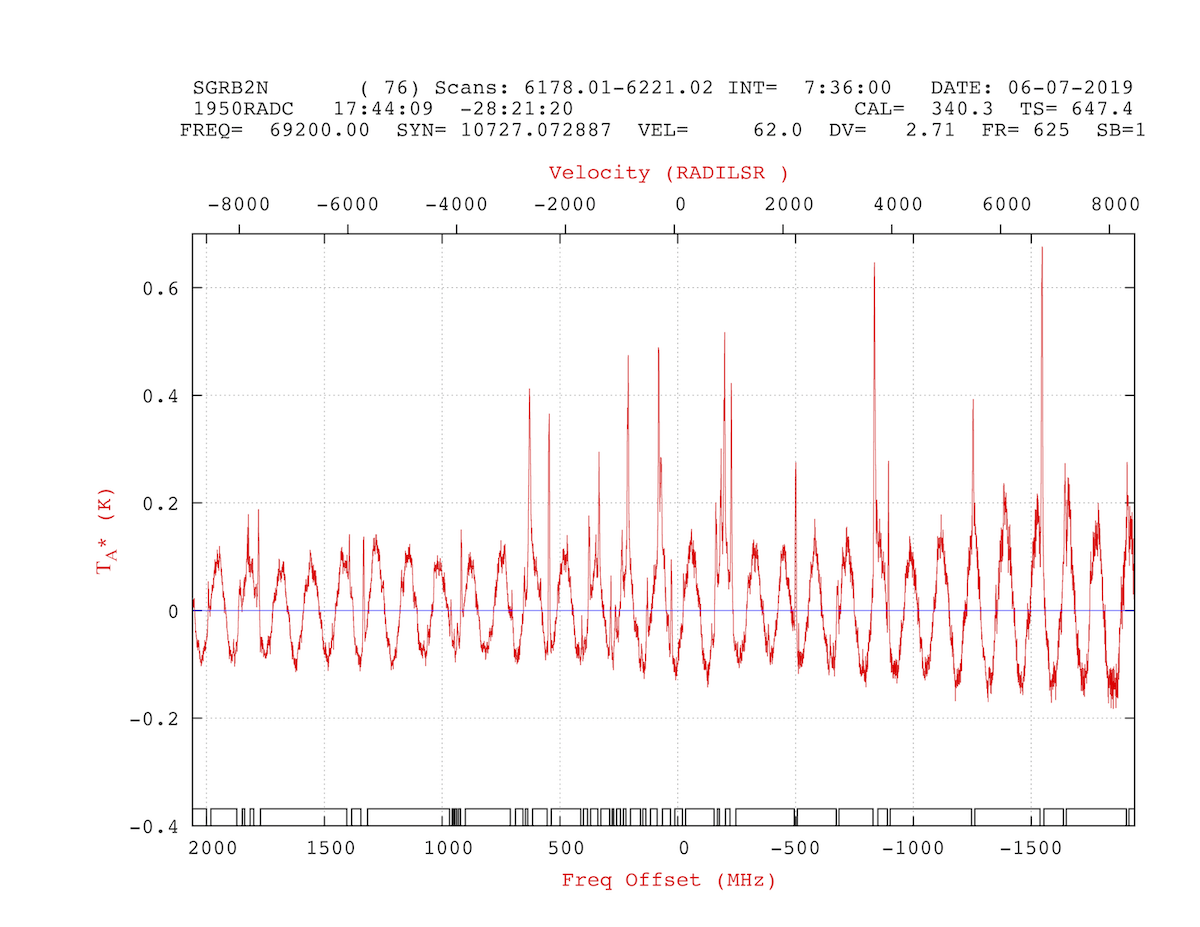
After defining the baselines we can remove the DC offset in the data.
    >
    > dcoffset /a
    >
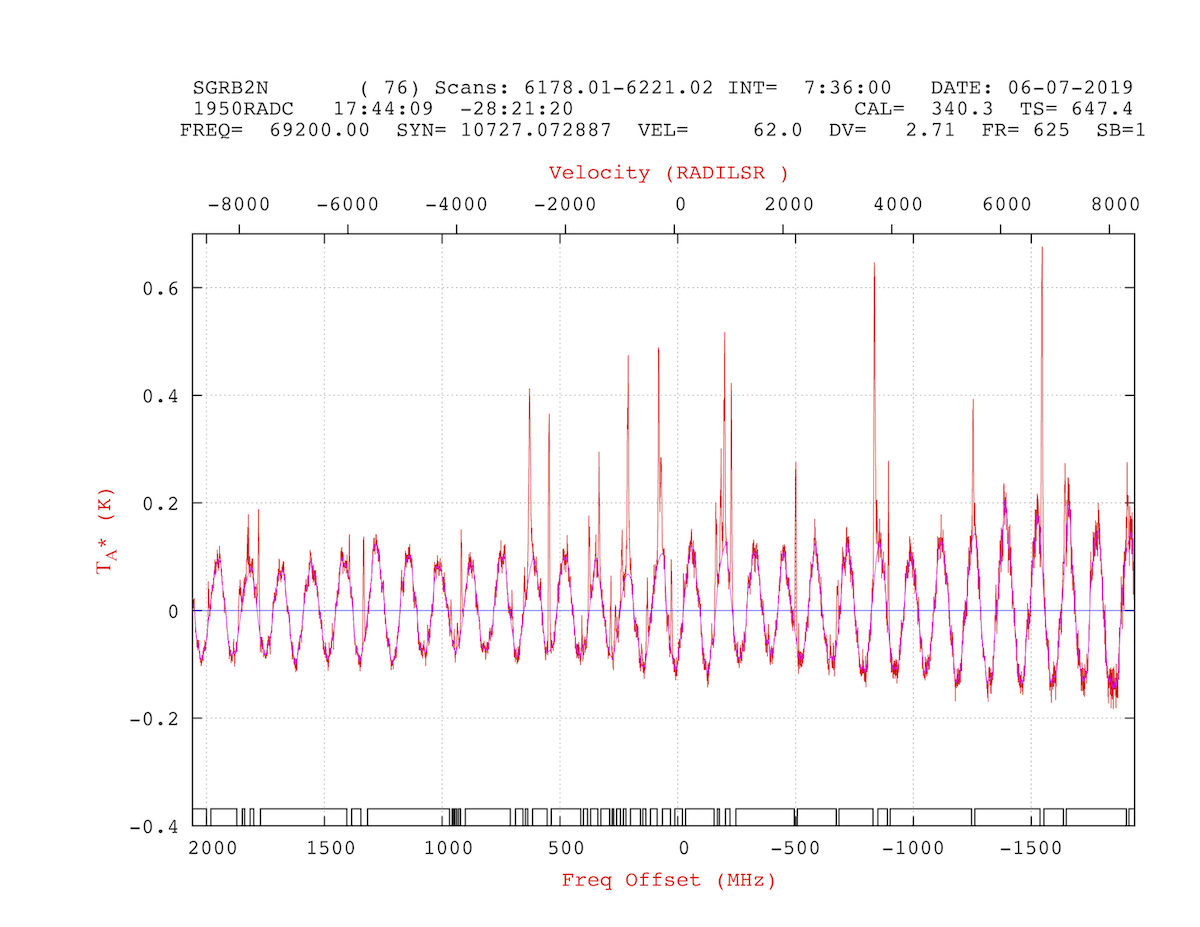
Now we need to fit the baseline using bshape. First set a few parameters. (Please note, there was a lot of experimentation with these values until a satisfactory fit was achieved.)
    >
    > nbshape = 11
    > bsmoothing = 1
    > nfit = 2

    > bshape
Figure 12 shows the fitted baseline model.
Finally, lets remove the baseline model from the data.
    >
    > rmbase
    >
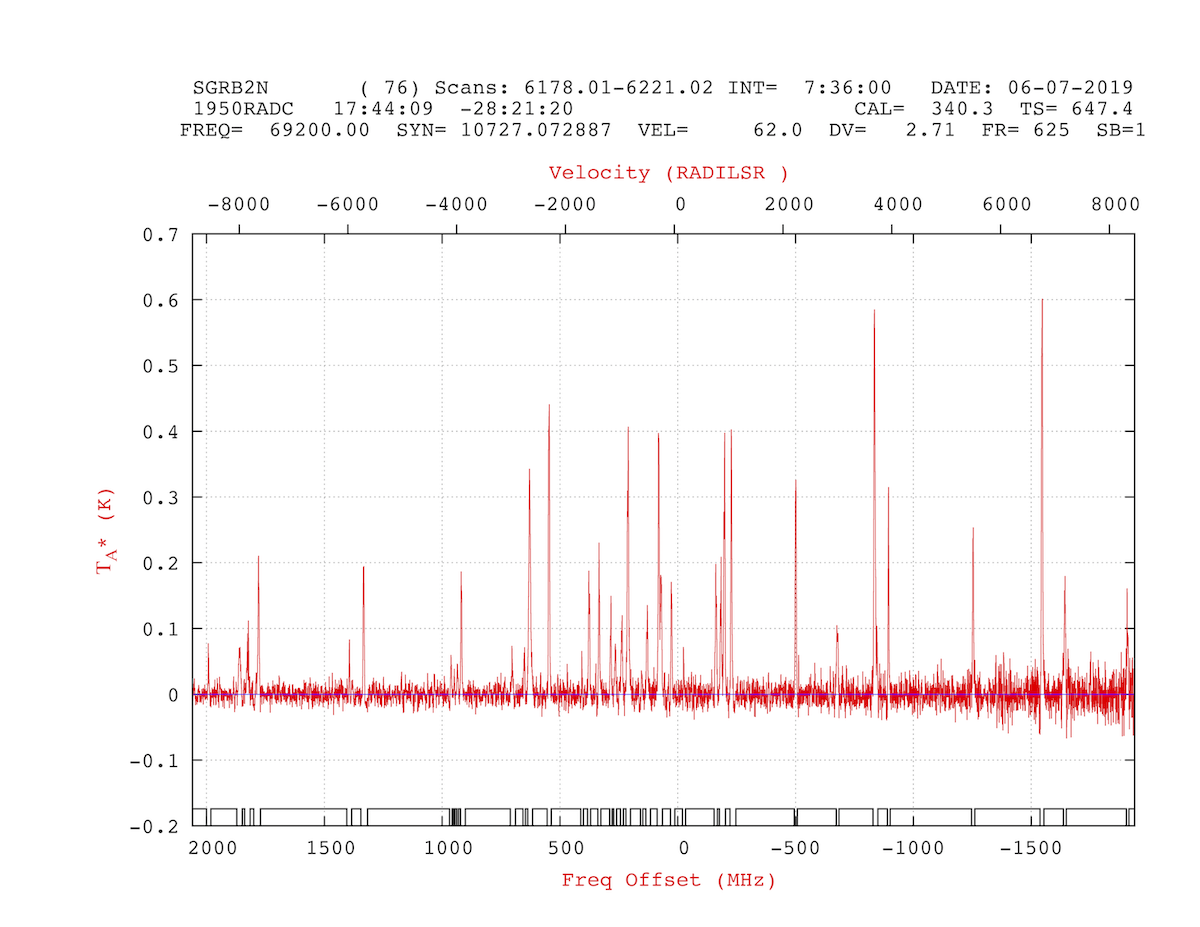
Again, much better results from where we started.
 1.8.5
1.8.5 
